
New Trig Identities from Similar Right Triangles
Loading the math board and drawing, please wait…
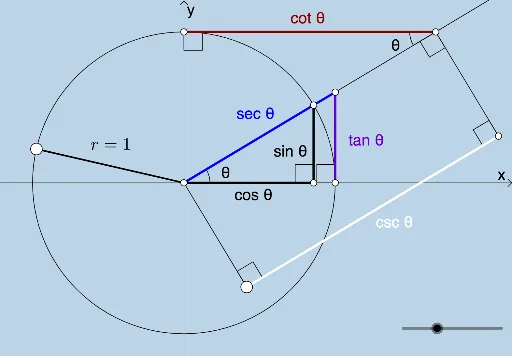
This example uses similar right triangles to derive new trigonometric identities and includes key questions. It demonstrates the properties of similar triangles and the concept of trigonometric functions. Using GeoGebra commands such as Intersect, Circle, Rotate, etc., it dynamically explores the geometric meaning of trigonometric identities. Suitable for high school mathematics education and learning.
GeoGebra Commands & Parameters
Intersect(xAxis, yAxis) → ACircle(A, 1) → cIntersect(c, b) → E, FRotate(F, (o * π / 180), A) → BRay(A, B) → aOrthogonalLine(B, b) → dIntersect(b, d) → CIntersect(b, xAxis) → DLine(F, d) → eAngle(b, a) → θSegment(A, B) → fAngle(B, C, A) → αSegment(A, C) → gSegment(C, B) → hIntersect(e, a) → GSegment(F, G) → iAngle(G, F, A) → βLine(G, b) → jSegment(A, G) → lPoint(c) → HSegment(A, H) → radiusOrthogonalLine(I, e) → mIntersect(m, a) → JSegment(I, J) → nAngle(J, I, A) → γAngle(I, J, A) → δOrthogonalLine(J, a) → pLine(A, p) → qPoint(q) → LOrthogonalLine(L, q) → sIntersect(p, s) → MSegment(L, M) → tAngle(J, M, L) → εAngle(M, L, A) → ζAngle(A, J, M) → ηSegment(J, M) → rSegment(A, L) → f_1
AI Drawing Prompt Reference
Draw a right triangle ABC with A as the right angle. Draw a circle c with A as the center and radius 1. Let c intersect line b at points E and F. Rotate F around A by π/180 to get B. Draw line a through B, and let it intersect b at C. Let the x-axis intersect b at D. Draw line e through F, and let it intersect a at G. Connect AG. Draw line j through G, and let it intersect b at I. Connect AI. Draw line m through I, and let it intersect a at J. Connect IJ. Draw line p through J, and let it intersect a at L. Connect AL. Draw line s through L, and let it intersect p at M. Connect LM.
The prompt above was compiled from the original drawing commands and is for reference only.