
New Pythagorean Trigonometric Theorem Demo
Loading the math board and drawing, please wait…
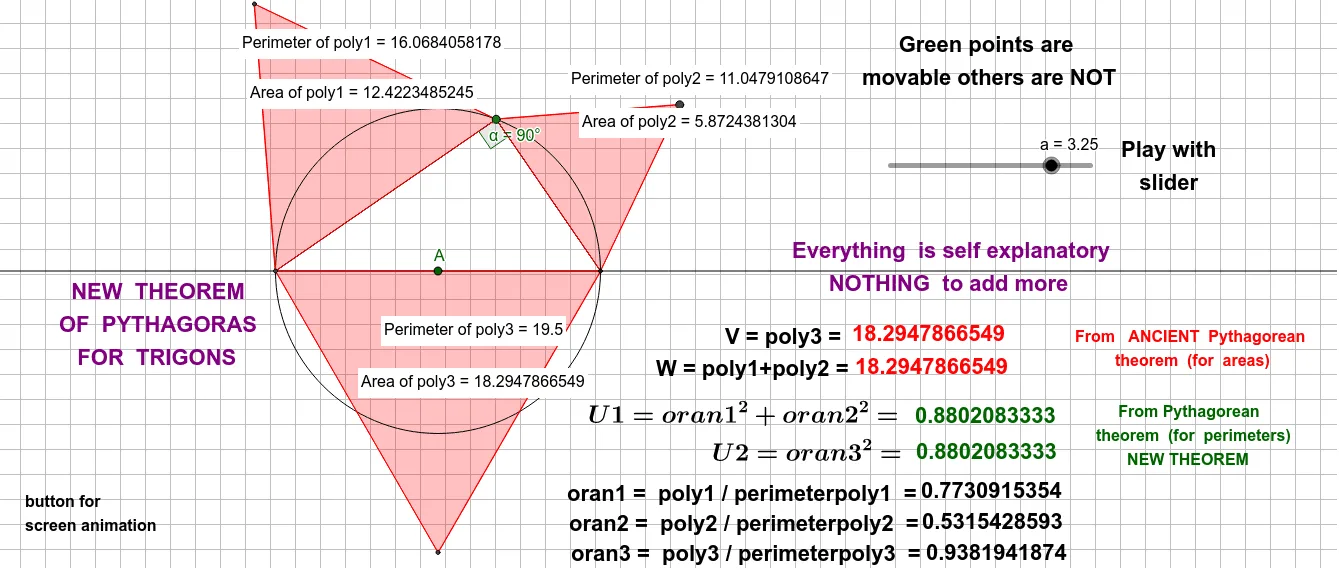
This example demonstrates a novel application of the Pythagorean theorem in trigonometry, visually illustrating the relationship between side lengths and angles in right triangles through dynamic geometry. Core mathematical concepts include the Pythagorean theorem, trigonometric functions, geometric transformations, and analytical geometry. Construction highlights involve GeoGebra commands/objects such as Circle, Point, Line, Intersect, Segment, Rotate, Polygon, Angle, PointIn, and Perimeter. Suitable for high school and above students to understand the intrinsic connection between trigonometric functions and geometric figures, enhancing spatial reasoning skills.
GeoGebra Commands & Parameters
Circle(A, a) → cPoint(c) → CLine(C, A) → fIntersect(c, f, 2) → DPoint(c) → BSegment(B, C) → gPoint(f) → ERotate(E, 90°, C) → E'Point(f) → FSegment(B, D) → hPolygon(D, B, 3) → poly1, i, j, k, GPolygon(B, C, 3) → poly2, l, m, n, HPolygon(C, D, 3) → poly3, p, q, r, IAngle(D, B, C) → αPointIn(poly1) → Pointpoly1_1PointIn(poly2) → Pointpoly2_1PointIn(poly3) → Pointpoly3_1Perimeter(poly1) → perimeterpoly1PointIn(poly1) → Pointpoly1Perimeter(poly2) → perimeterpoly2PointIn(poly2) → Pointpoly2Perimeter(poly3) → perimeterpoly3PointIn(poly3) → Pointpoly3
AI Drawing Prompt Reference
Draw a right triangle with a circle and three dynamically generated polygons. Start by drawing a circle centered at one vertex of the triangle and find the intersection points between the circle and the hypotenuse. Rotate a point on the hypotenuse 90 degrees around the right angle vertex and connect the relevant points to form three polygons. Display the vertices, side lengths, and angles of the polygons, and label the vertices of the right triangle and the points on the hypotenuse to illustrate the intrinsic connection between trigonometric functions and geometric figures.
The prompt above was compiled from the original drawing commands and is for reference only.