
Net of a Cube: Exploring Surface Area
Loading the math board and drawing, please wait…
In collections
Surface Area Discovery
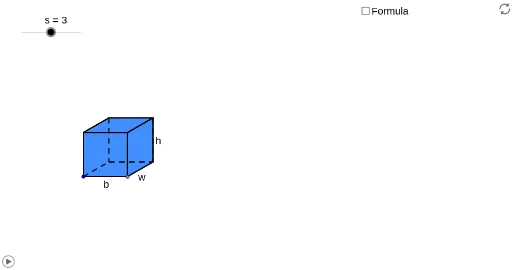
① This interactive applet demonstrates the net of a cube, allowing learners to visually explore how a three-dimensional cube unfolds into a two-dimensional pattern and verify the surface area formula. ② Core mathematical concepts include solid geometry, cube nets, surface area calculation, and spatial visualization skills. ③ Construction highlights: Based on the construction summary, the applet uses GeoGebra commands such as Point, Segment, Polygon, Circle, Line, Intersect, Rotate, OrthogonalLine, CircleArc, Vector, Translate, Ray, LineBisector, If, and Midpoint, creating multiple polygons (poly1 to poly4) and auxiliary lines, rotations, and translations to animate the unfolding and folding of the cube's six faces. ④ Suitable for upper elementary to middle school students learning introductory solid geometry, as well as for teachers demonstrating surface area derivation in class or for self-directed exploration.
GeoGebra Commands & Parameters
Point(Circle[A, s]) → BSegment(A, B) → aPolygon(A, B, 4) → poly1, a_1, b, c, d, C, DCircle(B, e) → fLine(A, B) → gIntersect(f, g, 2) → ERotate(E, 30°, B) → E'OrthogonalLine(E', g) → hSegment(B, E') → iLine(C, i) → jIntersect(h, j) → FPolygon(E', F, 4) → poly2, e', f_1, k, l, G, HPolygon(A, H, G, D) → poly3, a_2, h_1, g_1, d_1Polygon(C, F, E', B) → poly4, c_1, f_2, e'_1, b_1Circle(B, A) → pCircle(A, B) → qIntersect(q, g, 2) → IIntersect(p, g, 2) → JCircle(J, B) → rIntersect(r, g, 2) → KLine(J, e'_1) → mLine(K, e'_1) → nLine(I, a_2) → tLine(H, E') → e_1Intersect(t, e_1) → LIntersect(m, e_1) → MIntersect(n, e_1) → NLine(B, E') → i_1Line(A, H) → j_1Intersect(f, i_1, 2) → OLine(O, g) → k_1Circle(E', B) → p_1Intersect(p_1, i_1, 2) → PLine(P, e_1) → l_1Intersect(j_1, l_1) → QLine(C, B) → m_1Circle(C, B) → q_1Intersect(q_1, m_1, 2) → RLine(R, c_1) → n_1Intersect(h, n_1) → SIntersect(j_1, k_1) → TCircleArc(C, R, D) → r_1CircleArc(B, K, R) → s_1CircleArc(E', N, S) → t_1CircleArc(E', M, F) → c_2CircleArc(B, J, C) → d_2CircleArc(A, B, I) → e_2CircleArc(H, G, L) → g_2CircleArc(F, S, G) → h_2Vector(F, P) → uVector(C, O) → vVector(D, R) → wVector(S, N) → u_1Vector(D, I) → v_1Translate(D, Vector[(o * w)]) → D'_1Ray(C, D'_1) → b_2Intersect(r_1, b_2, 1) → UTranslate(G, Vector[(o * w)]) → G'_1Ray(F, G'_1) → i_2Intersect(h_2, i_2, 1) → VLineBisector(F, P) → j_2Intersect(f, j_2, 2) → WCircleArc(W, P, F) → k_2Line(W, l_1) → l_2LineBisector(G, Q) → m_2Intersect(l_2, m_2) → ZCircleArc(Z, Q, G) → p_2Translate(C, Vector[((o - 1) * v)]) → C'Translate(D, Vector[((o - 1) * v)]) → D'_2If(o < 1, C, If[o < 2, C', O]) → A_1If(o < 1, D, If[o < 2, D'_2, T]) → B_1Translate(D, Vector[((o - 2) * v_1)]) → D'Translate(G, Vector[((o - 2) * v_1)]) → G'_2Ray(A, D') → n_2Ray(H, G'_2) → q_2Intersect(e_2, n_2, 1) → C_1Intersect(g_2, q_2) → D_1,If(o < 2, G, If[o < 3, D_1, L]) → E_1If(o < 2, D, If[o < 3, C_1, I]) → F_1Translate(G, Vector[((o - 3) * u)]) → G'Translate(F, Vector[((o - 3) * u)]) → F'Ray(H, G') → r_2Ray(E', F') → s_2Intersect(p_2, r_2, 1) → G_1Intersect(k_2, s_2, 1) → H_1If(o < 3, G, If[o < 4, G_1, Q]) → I_1If(o < 3, F, If[o < 4, H_1, P]) → J_1Translate(S, Vector[((o - 4) * u_1)]) → S'Ray(E', S') → t_2Intersect(t_1, t_2, 1) → K_1Intersect(c_2, t_2, 1) → L_1Translate(R, Vector[((o - 4) * u_1)]) → R'Ray(B, R') → a_3Intersect(s_1, a_3, 1) → M_1Intersect(d_2, a_3, 1) → N_1If(o < 1, U, If[o < 4, R, If[o < 5, M_1, K]]) → O_1If(o < 1, V, If[o < 4, S, If[o < 5, K_1, N]]) → P_1If(o < 4, C, If[o < 5, N_1, J]) → Q_1If(o < 4, F, If[o < 5, L_1, M]) → R_1Midpoint(B, E') → S_1Midpoint(A, H) → T_1Line(T_1, S_1) → c_3Circle(S_1, a / 2) → d_3OrthogonalLine(S_1, c_3) → g_3Intersect(d_3, g_3) → U_1, V_1Polygon(U_1, V_1, 4) → poly11, u_2, v_2, k_3, l_3, W_1, Z_1Polygon(Z_1, W_1, 4) → poly12, z_1, w_1, m_3, n_3, A_2, B_2Polygon(U_1, Z_1, 4) → poly13, u_3, z_2, s_3, t_3, C_2, D_2Polygon(W_1, V_1, 4) → poly14, w_2, v_3, c_4, d_4, E_2, F_2Polygon(V_1, U_1, 4) → poly15, v_4, u_4, e_4, f_4, G_2, H_2Polygon(H_2, G_2, 4) → poly16, h_6, g_4, i_4, j_4, I_2, J_2Segment(B, U_1) → m_4LineBisector(m_4) → n_4Vector(B, U_1) → zVector(T, C_2) → z_4Vector(L, A_2) → u_5Vector(P, E_2) → w_5Translate(I, Vector[(z * (o - 5))]) → I'Translate(A, Vector[(z * (o - 5))]) → A'Translate(B, Vector[(z * (o - 5))]) → B'Translate(J, Vector[(z * (o - 5))]) → J'Translate(K, Vector[(z * (o - 5))]) → K'Translate(L, Vector[(u_5 * (o - 5))]) → L'Translate(H, Vector[(u_5 * (o - 5))]) → H'Translate(E', Vector[(u_5 * (o - 5))]) → E''Translate(M, Vector[(u_5 * (o - 5))]) → M'Translate(N, Vector[(u_5 * (o - 5))]) → N'Translate(T, Vector[(z_4 * (o - 5))]) → T'Translate(O, Vector[(z_4 * (o - 5))]) → O'Translate(P, Vector[(w_5 * (o - 5))]) → P'Translate(Q, Vector[(w_5 * (o - 5))]) → Q'If(o < 5, O_1, If[o < 6, K', I_2]) → K_2If(o < 5, P_1, If[o < 6, N', J_2]) → L_2If(o < 5, Q_1, If[o < 6, J', G_2]) → M_2If(o < 5, R_1, If[o < 6, M', H_2]) → N_2If(o < 5, E', If[o < 6, E'', V_1]) → O_2If(o < 5, H, If[o < 6, H', W_1]) → P_2If(o < 5, E_1, If[o < 6, L', A_2]) → Q_2If(o < 5, J_1, If[o < 6, P', E_2]) → R_2If(o < 5, I_1, If[o < 6, Q', F_2]) → S_2If(o < 5, B, If[o < 6, B', U_1]) → T_2If(o < 5, A, If[o < 6, A', Z_1]) → U_2If(o < 5, A_1, If[o < 6, O', D_2]) → V_2If(o < 5, B_1, If[o < 6, T', C_2]) → W_2If(o < 5, F_1, If[o < 6, I', B_2]) → Z_2Polygon(Z_2, Q_2, P_2, U_2) → poly5, z_3, q_3, p_3, u_6Polygon(U_2, T_2, V_2, W_2) → poly6, u_7, t_4, v_5, w_3Polygon(U_2, P_2, O_2, T_2) → poly7, u_8, p_4, o_2, t_5Polygon(O_2, N_2, M_2, T_2) → poly8, o_1, n_5, m_5, t_6Polygon(N_2, L_2, K_2, M_2) → poly9, n_6, l_4, k_4, m_6Polygon(O_2, R_2, S_2, P_2) → poly10, o_3, r_3, s_4, p_5Intersect(k, v_5) → B_3Segment(G, B_3) → b_3Intersect(v_5, a_2) → A_3Segment(P_2, A_3) → e_3Intersect(t_4, p_5) → C_3Intersect(m_5, p_5) → D_3Segment(D_3, C_3) → f_3Segment(D_3, P_2) → h_3Point(Circle[E_3, s]) → F_3Segment(E_3, F_3) → j_3Line(E_3, F_3) → a_4Circle(F_3, e) → h_4Intersect(h_4, a_4, 2) → G_3Rotate(G_3, 30°, F_3) → H_3Segment(F_3, H_3) → b_4Line(H_3, j_3) → q_4Line(E_3, b_4) → r_4Intersect(q_4, r_4) → I_3OrthogonalLine(H_3, q_4) → a_5OrthogonalLine(F_3, j_3) → b_5OrthogonalLine(E_3, a_4) → c_5OrthogonalLine(I_3, q_4) → d_5Circle(E_3, s) → e_5Intersect(e_5, c_5, 2) → J_3OrthogonalLine(J_3, c_5) → f_5Circle(I_3, s) → g_5Intersect(g_5, d_5, 2) → K_3OrthogonalLine(K_3, d_5) → h_5Intersect(a_5, h_5) → L_3Intersect(b_5, f_5) → M_3Polygon(J_3, M_3, L_3, K_3) → poly17, j_5, m_7, l_5, k_5Polygon(J_3, E_3, F_3, M_3) → poly18, j_6, e_6, f_6, m_8Polygon(F_3, M_3, L_3, H_3) → poly19, f_7, m_9, l_6, h_7Polygon(I_3, K_3, L_3, H_3) → poly20, i_5, k_6, l_7, h_8Polygon(E_3, J_3, K_3, I_3) → poly21, e_7, j_7, k_7, i_6Polygon(E_3, I_3, H_3, F_3) → poly22, e_8, i_7, h_9, f_8
AI Drawing Prompt Reference
Draw the net of a cube, showing how its six faces unfold into a 2D pattern. Start with a square, then rotate and draw adjacent squares around one edge to form a foldable layout. Use auxiliary lines, arcs, and rotation animations to demonstrate how the cube folds and unfolds, labeling key points and lines for surface area calculation understanding.
The prompt above was compiled from the original drawing commands and is for reference only.