
Multiplying Fractions Visualized with Square Grids
Loading the math board and drawing, please wait…
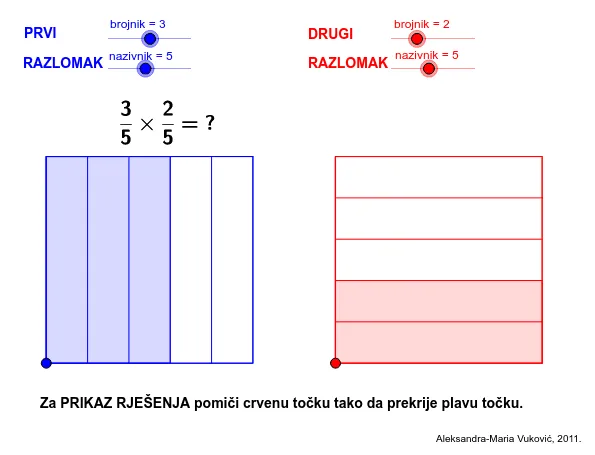
This GeoGebra example illustrates the multiplication of two fractions using a geometric area model with square grids. It demonstrates how the product of fractions corresponds to the overlapping area when one fraction is represented along one dimension and the other along the other dimension. Core mathematical concepts include fraction multiplication, numerator and denominator operations, and area representation. The construction uses commands such as Polygon, Point, Segment, Dilate, Sequence, Translate, Intersect, and If to create and manipulate squares, grids, and dynamic text labels. Suitable for upper elementary and middle school students learning fraction operations, as well as for teachers seeking an interactive visual aid for classroom instruction.
GeoGebra Commands & Parameters
Polygon(A, B, 4.0) → Kvadrat1, a, b, c, d, C, DLine(A, B) → ePoint(e) → ESegment(A, E) → fPoint(f) → FPoint(Circle[F, 5.0]) → GSegment(F, G) → gPolygon(F, G, 4.0) → Kvadrat2, f_1, g_1, h, i, H, IDilate(B, 1.0 / nazivnik_1, A) → B_1Sequence(Segment[Translate[D, i * Vector[A, B_1]], Translate[A, i * Vector[A, B_1]]], i, 1.0, nazivnik_1 - 1.0) → podjelaKvadrata1Dilate(H, 1.0 / nazivnik_2, G) → H_1Sequence(Segment[Translate[F, i * Vector[G, H_1]], Translate[G, i * Vector[G, H_1]]], i, 1.0, nazivnik_2 - 1.0) → podjelaKvadrata2Translate(A, Vector[brojnik_1 * Vector[A, B_1]]) → B_2Translate(B_2, Vector[Vector[A, D]]) → C_2Translate(G, Vector[brojnik_2 * Vector[G, H_1]]) → H_2Translate(H_2, Vector[Vector[G, F]]) → I_2Polygon(A, B_2, C_2, D) → pRazlomak1, a_1, b_2, c_2, d_1Polygon(F, G, H_2, I_2) → pRazlomak2, f_2, g_2, h_2, i_2Line(B_2, C_2) → jLine(I_2, H_2) → kIntersect(j, k) → SPolygon(A, B_2, S, I_2) → presjek, a_2, b_1, s, i_1If(Distance[A, F] < 0.01, true, false) → Over
AI Drawing Prompt Reference
Draw two adjacent squares, one horizontal and one vertical, sharing a common vertex. Divide each square into a grid of equal small squares using parallel lines, with the number of divisions controlled by two sliders. From the bottom-left corner of the first square, mark off a rectangle along the bottom and left sides corresponding to the numerator of the first fraction; similarly, mark off a rectangle in the second square for the second fraction. Highlight the overlapping area of these two rectangles in a distinct color to represent the product of the fractions. Add dynamic text labels showing the two fractions and their product.
The prompt above was compiled from the original drawing commands and is for reference only.