
Stoicoviciu Polygon Rings: Mathematical Art with Rotations and Reflections
Loading the math board and drawing, please wait…
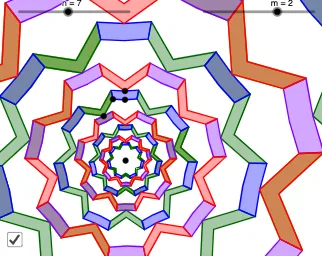
This example demonstrates a ring-like geometric art pattern formed by a sequence of polygons, created through rotations, reflections, and scaling to produce a symmetric and visually striking composition. Core mathematical concepts include polygons, rotational transformations, mirror reflections, sequence generation, and tangent lines. Construction highlights: using GeoGebra commands such as Line, Point, Rotate, Mirror, Polygon, Sequence, and First, the construction defines multiple points (A, B, C, D, E, F, G) and polygons (poly1, poly2), then applies rotations and reflections to generate derived objects (C', D', F', etc.), resulting in a chain of polygons arranged in a ring. Suitable for high school and above to explore geometric transformations, sequence construction, and the intersection of mathematics and art, as well as for visual math education or creative coding inspiration.
GeoGebra Commands & Parameters
Line(A, B) → fPoint(Ray[B, (2 * B) - A]) → CRotate(f, (180°) / n, A) → f'Rotate(C, (180°) / n, A) → C'PointIn(CircleSector[A, C, C']) → DPoint(Segment[A, C']) → EMirror(F, f) → F'Mirror(D, f) → D'Mirror(D, f') → D'_1Mirror(F, f') → F'_1Polygon(D'_1, E, D, F, G, F'_1) → poly1, d'_1, e, d, f_1, g, f'_1Polygon(D, B, D', F', C, F) → poly2, d_1, b, d', h, c, f_2Sequence(Polygon[Rotate[D'_1, (i * (360°) / n), A], Rotate[E, (i * (360°) / n), A], Rotate[D, (i * (360°) / n), A], Rotate[F, (i * (360°) / n), A], Rotate[G, (i * (360°) / n), A], Rotate[F'_1, (i * (360°) / n), A]], i, 0, n - 1) → l1Sequence(Polygon[Rotate[D, (i * (360°) / n), A], Rotate[B, (i * (360°) / n), A], Rotate[D', (i * (360°) / n), A], Rotate[F', (i * (360°) / n), A], Rotate[C, (i * (360°) / n), A], Rotate[F, (i * (360°) / n), A]], i, 0, n - 1) → l2Sequence(Dilate[l1, r^(i), A], i, (-2 * m), (2 * m), 2) → l3Sequence(Dilate[l2, r^(i), A], i, (-2 * m), (2 * m), 2) → l4Sequence(Dilate[Rotate[l2, (180°) / n, A], r^(i), A], i, (-2 * m) + 1, (2 * m) - 1, 2) → l5Sequence(Dilate[Rotate[l1, (180°) / n, A], r^(i), A], i, (-2 * m) + 1, (2 * m) - 1, 2) → l6First(Shuffle[Flatten[l3]], (2 * m) + n) → l7First(Shuffle[Flatten[l4]], (2 * m) + n + 2) → l8First(Shuffle[Flatten[l5]], (2 * m) + n + 2) → l9First(Shuffle[Flatten[l6]], (2 * m) + n + 2) → l10
AI Drawing Prompt Reference
Start with a chosen center point and a reference line. Pick an integer n and generate a point from the ray direction so it forms a sector at the center; use the points on the sector/circle to define additional points on a segment. Create rotated copies of the initial line and points around the center by angles of 180°/n and multiples of 360°/n. Construct mirror images of certain points and/or segments across the reference line and its rotated version to obtain corresponding reflected points. Connect the obtained rotated and mirrored points to form two polygon types, then repeat each polygon around the center using the 360°/n step to build two rotational polygon rings (a chain of polygons arranged circularly). Produce multiple layers by geometrically dilating these ring chains about the center with a common ratio, and for added variety shuffle and select a subset of the pieces so the final artwork looks symmetric yet ring-like.
The prompt above was compiled from the original drawing commands and is for reference only.