
Multiplying Fractions Using Visual Models
Loading the math board and drawing, please wait…
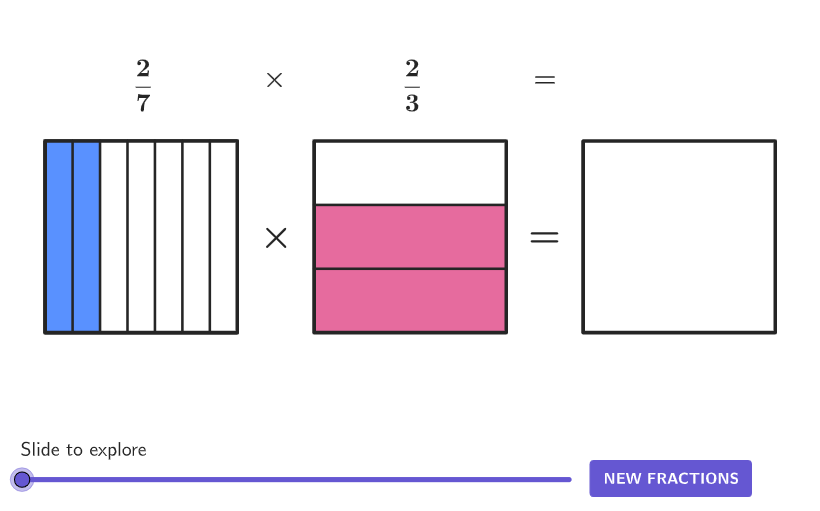
This GeoGebra activity demonstrates the rules of fraction multiplication through visual area models, allowing learners to see why multiplying numerators and denominators works geometrically. The core math concept is fraction multiplication, including fraction × fraction and fraction × whole number, with emphasis on understanding the product's size and simplification. Construction-wise, the summary reveals commands such as Shuffle, Element, Corner, Polygon, Translate, and Sequence, with objects like denominators1/2, numerators1/2, frac1/frac2, and fracProd, which dynamically partition and translate rectangular regions to represent the product of two fractions. Suitable for grades 4-5 or early middle school, this resource is ideal for exploratory learning and classroom demonstration, accompanied by open-ended questions that deepen conceptual connections and problem-solving skills.
GeoGebra Commands & Parameters
Shuffle(Sequence[2, 10]) → denominators2, {3, 6, 8, 10, 9, 2, 7, 4, 5}Shuffle(Sequence[2, 10]) → denominators1, {7, 9, 3, 2, 8, 5, 4, 10, 6}Element(denominators1, Mod[example, Length[denominators1]] + 1) → den1Element(denominators2, Mod[example, Length[denominators2]] + 1) → den2Shuffle(Sequence[1, den1 - 1]) → numerators1, {2, 4, 6, 3, 5, 1}Shuffle(Sequence[1, den2 - 1]) → numerators2, {2, 1}Corner(5) → AppSizePolygon({(0, 0), (5, 0), (5, 5), (0, 5)}) → q1Translate(q1, Vector[(7, 0)]) → q2Translate(q2, Vector[(7, 0)]) → q3Element(numerators1, 1) → num1Element(numerators2, 1) → num2Sequence(Segment[((5 * ii / den1), 0), ((5 * ii / den1), 5)], ii, 1, den1 - 1) → verticalSegmentsFixedSequence(Segment[(7, (5 * ii / den2)), (12, (5 * ii / den2))], ii, 1, den2 - 1) → horizontalSegmentsFixedPolygon({(0, 0), ((5 * num1 / den1), 0), ((5 * num1 / den1), 5), (0, 5)}) → frac1Polygon({(7, 0), (12, 0), (12, (5 * num2 / den2)), (7, (5 * num2 / den2))}) → frac2Translate(frac1, Vector[(Vector[(14, 0)] * Min[a, 1])]) → frac1TransTranslate(verticalSegmentsFixed, Vector[(Vector[(14, 0)] * Min[a, 1])]) → verticalSegmentsMovingTranslate(q1, Vector[(Vector[(14, 0)] * Min[a, 1])]) → q1TranslatedTranslate(q2, Vector[(Vector[(7, 0)] * Max[a - 1, 0])]) → q2TransTranslate(horizontalSegmentsFixed, Vector[(Vector[(7, 0)] * Max[a - 1, 0])]) → horizontalSegmentsMovingTranslate(frac2, Vector[(Vector[(7, 0)] * Max[a - 1, 0])]) → frac2TransPolygon({(14, 0), (14 + (5 * num1 / den1), 0), (14 + (5 * num1 / den1), (5 * num2 / den2)), (14, (5 * num2 / den2))}) → fracProd
AI Drawing Prompt Reference
Draw a visual model to demonstrate the multiplication of fractions. Include two rectangular areas representing two fractions. Adjust and move these rectangles dynamically to show the geometric meaning of fraction multiplication. Start by drawing a base rectangle, then draw a rectangle on the right to represent the second fraction. Divide the rectangles into multiple sections based on the numerators and denominators of the fractions, and combine the corresponding sections through translation operations to form the final product rectangle, visually demonstrating the calculation process of fraction multiplication.
The prompt above was compiled from the original drawing commands and is for reference only.