
Animated Model for Multiplying a Whole Number by a Fraction
Loading the math board and drawing, please wait…
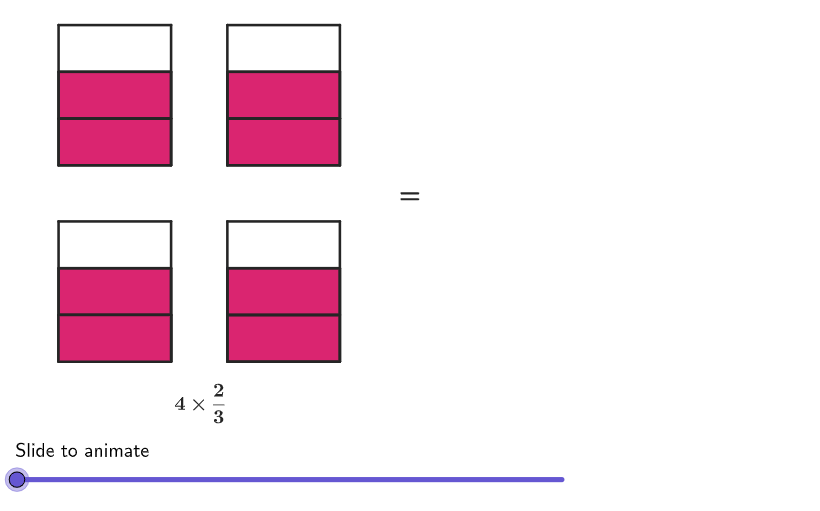
This GeoGebra example provides an interactive animated model that visually demonstrates the multiplication of a whole number by a fraction, making the concept of 'repeated fractional parts' tangible for learners. The core mathematical concept is fraction multiplication, specifically how to combine whole-number copies of a unit fraction and simplify the resulting product. The construction uses a variety of GeoGebra commands including Shuffle, Element, Sequence, Polygon, Corner, Text, and Denominator to generate random fractions and integers, build grid regions, and display results. Sliders control the animation, while conditional statements (If) and commands like Flatten and Zip manage simplification and visual feedback. This resource is designed for grades 4-5 students, supporting exploration of fraction operations through dynamic manipulation. It is suitable for classroom demonstrations, independent practice, and cross-linguistic learning with Spanish translation available.
GeoGebra Commands & Parameters
Shuffle(Sequence[2, 6]) → ints, {4, 5, 2, 3, 6}Element(ints, Mod[example, Length[ints]] + 1) → intShuffle(Sequence[2, 10]) → dens, {3, 5, 2, 6, 8, 7, 9, 10, 4}Element(dens, Mod[example, Length[dens]] + 1) → denShuffle(KeepIf[(kk / den * int) ≤ 4, kk, Sequence[den - 1]]) → nums, {2, 1}Corner(5) → AppSizeElement({If2, If3, If4, If5, If6}, int - 1) → CornersLeftElement({If1R, If2R, If3R, If4R}, n) → CornersRightPolygon({(0, 0), (8, 0), (8, 6), (0, 6)}) → region1Polygon({(9, 0), (14, 0), (14, 6), (9, 6)}) → region2Polygon(CornerFracMod1, CornerFracMod2, CornerFracMod3, CornerFracMod4) → fracMod, sidebottom, sideright, sidetop, sideleftSequence(Segment[Translate[CornerFracMod1, Vector[(kk * (0, hei / den))]], Translate[CornerFracMod2, Vector[(kk * (0, hei / den))]]], kk, 1, den - 1) → modelDivisionsPolygon({CornerFracMod1, CornerFracMod2, Translate[CornerFracMod2, (0, hei / den)], Translate[CornerFracMod1, (0, hei / den)]}) → fracPartZip(Translate[{sidebottom, sideleft, sideright, sidetop}, Vector[CornerFracMod1, PP]], PP, CornersLeft) → m1Zip(Translate[modelDivisions, Vector[CornerFracMod1, PP]], PP, CornersLeft) → m2Flatten(Zip[Sequence[Translate[PP, (0, (ii * hei / den))], ii, 0, num - 1], PP, CornersLeft]) → CornersTilesLeftZip(Translate[{sidebottom, sideleft, sideright, sidetop}, Vector[CornerFracMod1, PP]], PP, CornersRight) → m3Zip(Translate[modelDivisions, Vector[CornerFracMod1, PP]], PP, CornersRight) → m4Zip(Translate[fracPart, PP - (0, 3.5)], PP, CornersTilesLeft) → TilesLeftFlatten(Zip[Sequence[Translate[PP, (0, (ii * hei / den))], ii, 0, den - 1], PP, CornersRight]) → CornersTilesRightSequence(Translate[Element[TilesLeft, ii], Vector[(Min[Max[anim - ii, 0], 1] * Vector[CornersTilesLeft(ii), CornersTilesRight(ii)])]], ii, 1, Length[CornersTilesLeft]) → TilesMovingText(centerText[(strSize * " px"), Element[{text1, text3}, Mod[example, 2] + 1]], (0, 0), true, true, 1, -1) → text4Text(centerText["240 px", text6], (9, 0), true, true, 1, -1) → text7Text("=", (xequal, -0.7), true, true, 0, 0) → text5Text("=", (xequal, 3), true, true, 0, 0) → text2Denominator(result) → denominatorResultZip(Sequence[Translate[Polygon[{PP, PP + (wid, 0), PP + (wid, hei / denominatorResult), PP + (0, hei / denominatorResult)}], (0, (ii * hei / denominatorResult))], ii, 0, denominatorResult - 1], PP, CornersRight) → m5
AI Drawing Prompt Reference
Create a dynamic model for multiplying a whole number by a fraction, featuring an 8x6 rectangle and a 9x6 rectangle. Use a slider to control the animation, showing how fractional parts are repeated to represent the multiplication of a whole number by a fraction. In both rectangles, demonstrate the multiplication through transformations and divisions, and finally display the simplified result.
The prompt above was compiled from the original drawing commands and is for reference only.