
Multiplying & Dividing by Powers of 10
Loading the math board and drawing, please wait…
In collections
Concrete-Pictorial-Abstract and the Teaching for Mastery
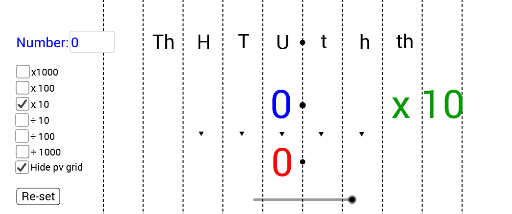
This example demonstrates how to multiply and divide by powers of 10 using GeoGebra. Key mathematical concepts include multiplication and division. Using commands like If and Textfield, users can dynamically observe how numerical changes affect the graph. Suitable for middle school and above students.
GeoGebra Commands & Parameters
If(m ≟ true, 1, 0) → B6Textfield(A2) → InputBox6If(e ≟ true, (1000 * A2), 0) → D3If(d ≟ true, (100 * A2), 0) → D4If(c ≟ true, (10 * A2), 0) → D5If(m ≟ true, A2 / 10, 0) → D6If(o ≟ true, A2 / 100, 0) → D7If(r ≟ true, A2 / 1000, 0) → D8
AI Drawing Prompt Reference
Create a dynamic graph showing multiplication and division by powers of 10. Include an input box for entering a value, with sliders to control the display of results multiplied by 10, 100, 1000, and divided by 10, 100, 1000, differentiated by colors, and show these values' changes in the coordinate system.
The prompt above was compiled from the original drawing commands and is for reference only.