
Reading Slopes from Equations of Straight Lines: Interactive Practice
Loading the math board and drawing, please wait…
In collections
Introduction to Linear Functions and Graphs
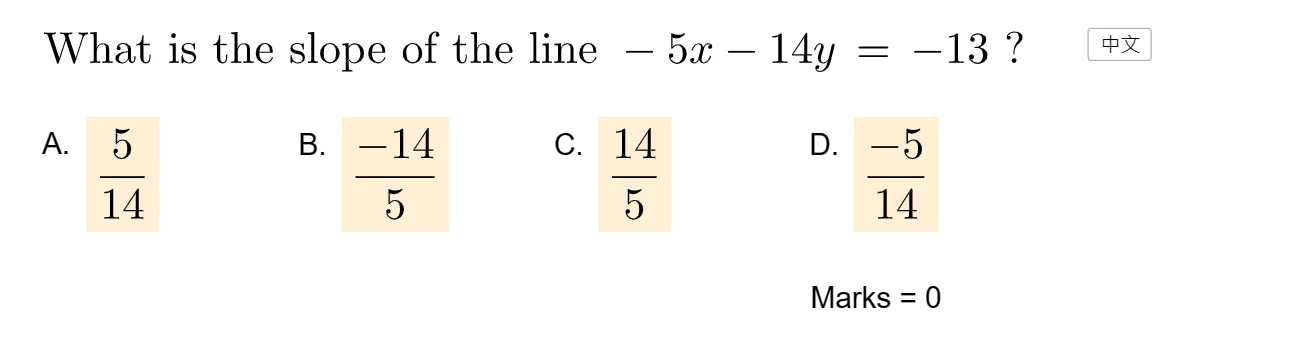
① This interactive GeoGebra example presents a series of straight-line equations and asks learners to read the slope from each equation and select the correct answer, reinforcing the connection between algebraic form and geometric meaning. ② Core mathematical concepts include the slope-intercept form (y = mx + c), the geometric interpretation of slope as rise over run, and the skill of extracting the slope coefficient directly from the equation. ③ Construction highlights: The applet uses GeoGebra commands such as Sample, Line, GCD, and Shuffle to generate random equations and distractors; key objects include listY, listX, Q, P, f, a', b', c', gcd, b, a, m, and text elements for feedback; a buttonNext advances to the next question, while textCorrect and textWrong1-3 provide immediate response, with picCorrect and picWrong as visual cues. The construction also references isosceles and similar triangles, but the primary focus is on linear equations. ④ Suitable for middle school to high school students, this resource serves as a drill-and-practice tool for mastering slope extraction from linear equations, useful in classroom settings or self-study.
GeoGebra Commands & Parameters
Sample(Sequence[-5, 5], 2, false) → listY, {-3, 2}Sample(Sequence[-12, 12], 2, false) → listX, {11, -3}Line(P, Q) → fGCD({a', b', c'}) → gcdShuffle({A, B, C, D}) → listPos, {(6, 5), (1, 5), (-9, 5), (-4, 5)}
AI Drawing Prompt Reference
Draw a series of randomly generated straight lines with equations y = mx + c, where m is a randomly selected slope and c is a randomly selected y-intercept. Plot these lines on a coordinate plane and display four answer options positioned on the same horizontal line for selecting the correct slope. Provide visual and textual feedback to indicate the correct answer, along with examples of correct and incorrect graphs.
The prompt above was compiled from the original drawing commands and is for reference only.