
Derivative Function
Loading the math board and drawing, please wait…
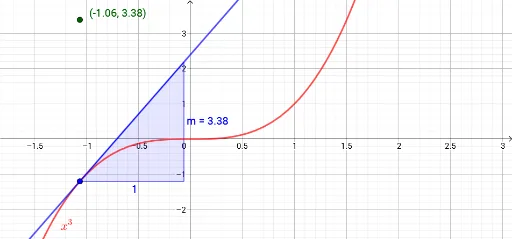
This example illustrates the concept of a derivative function. By plotting a function, users can observe the derivative at a specific point, which is the slope of the tangent line at that point. The construction summary mentions the use of commands such as Point, Tangent, Slope, Derivative, and Textfield. Suitable for high school mathematics, particularly in calculus.
GeoGebra Commands & Parameters
Point(A1) → ATangent(A, A1) → fSlope(f) → mDerivative(A1) → A2Textfield(A1) → InputBox1
AI Drawing Prompt Reference
Draw a function graph and select a point on it to show the tangent line and its slope. Then calculate the derivative at that point and label the derivative value on the graph. Finally, add a text box to input the coordinates of the point.
The prompt above was compiled from the original drawing commands and is for reference only.