
Multiplication Demonstration by Jack Kutilek
Loading the math board and drawing, please wait…
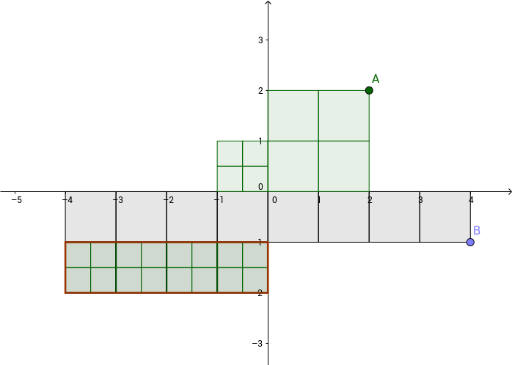
This example demonstrates the basic concept of multiplication. Core mathematical concepts include multiplication operations. Construction highlights include the use of Flatten, Zip, Dilate, Translate, Polygon commands in GeoGebra. Suitable for upper elementary or middle school mathematics education.
GeoGebra Commands & Parameters
Flatten(Sequence[Sequence[(b, c), b, 0, x(B) - 1], c, -1, y(B), -1]) → bListZip(Polygon[(x(a), y(a)), (x(a) + 1, y(a)), 4], a, bList) → list7Flatten(Sequence[Sequence[(b, c), b, 0, x(A) - 1], c, 0, y(A) - 1]) → aListDilate(Translate[list7, Vector[((-x(B)), 0)]], -1 / y(B)) → list8Zip(Polygon[(x(a), y(a)), (x(a) + 1, y(a)), 4], a, aList) → list5Dilate(Translate[list5, Vector[((-x(A)), 0)]], 1 / y(A)) → list6Translate(Stretch[list8, Vector[((-(x(A) / y(A))), 0)]], Vector[(0, -1)]) → list2Translate(Zip[Dilate[Translate[list5, Vector[(((-x(A)) * (x(z) + 1)), (y(z) * y(A)))]], (-(1 / ((y(A) * y(B)))))], z, bList], Vector[(0, -1)]) → list1Polygon((0, -1), ((-product), -1), ((-product), -2), (0, -2)) → poly1, f, g, h, i
AI Drawing Prompt Reference
Draw a multiplication demonstration: create two sets of unit square grids on a coordinate plane. The first set extends horizontally with a number of squares equal to the first factor, and vertically downward. The second set extends horizontally with a number of squares equal to the second factor, and vertically upward. Translate and scale each set so they align on the same horizontal line, then overlap them to form a new rectangle whose area represents the product. Finally, draw a rectangle at the bottom labeled with the product value.
The prompt above was compiled from the original drawing commands and is for reference only.