
Arithmetic of Ratios
Loading the math board and drawing, please wait…
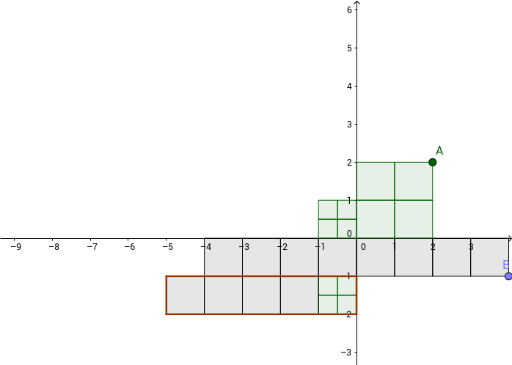
This example demonstrates arithmetic operations with ratios, involving concepts such as arithmetic, quadratic equations, mode, conic sections, area, and equations. Using GeoGebra commands like Flatten, Zip, Dilate, Polygon, and Translate, the example constructs geometric figures related to ratio arithmetic. Suitable for middle and high school students learning about ratio arithmetic and related geometry.
GeoGebra Commands & Parameters
Flatten(Sequence[Sequence[(b, c), b, 0, x(B) - 1], c, -1, y(B), -1]) → bListZip(Polygon[(x(a), y(a)), (x(a) + 1, y(a)), 4], a, bList) → list7Flatten(Sequence[Sequence[(b, c), b, 0, x(A) - 1], c, 0, y(A) - 1]) → aListDilate(Translate[list7, Vector[((-x(B)), 0)]], -1 / y(B)) → list8Zip(Polygon[(x(a), y(a)), (x(a) + 1, y(a)), 4], a, aList) → list5Dilate(Translate[list5, Vector[((-x(A)), 0)]], 1 / y(A)) → list6Polygon((0, -1), ((-sum), -1), ((-sum), -2), (0, -2)) → poly1, f, g, h, iTranslate(list6, Vector[(0, -2)]) → list6'Translate(list8, Vector[((-(x(A) / y(A))), -1)]) → list8'
AI Drawing Prompt Reference
Draw a figure containing multiple quadrilaterals that are related through scaling and translation operations. First, create a series of quadrilaterals based on point B's coordinates, then adjust their positions through scaling and horizontal translation. Next, create another series of quadrilaterals based on point A's coordinates, and adjust their positions through scaling and horizontal translation. Finally, draw a rectangle as a background and use translation to place the two series of quadrilaterals below the rectangle.
The prompt above was compiled from the original drawing commands and is for reference only.