
Multiplication Box Method
Loading the math board and drawing, please wait…
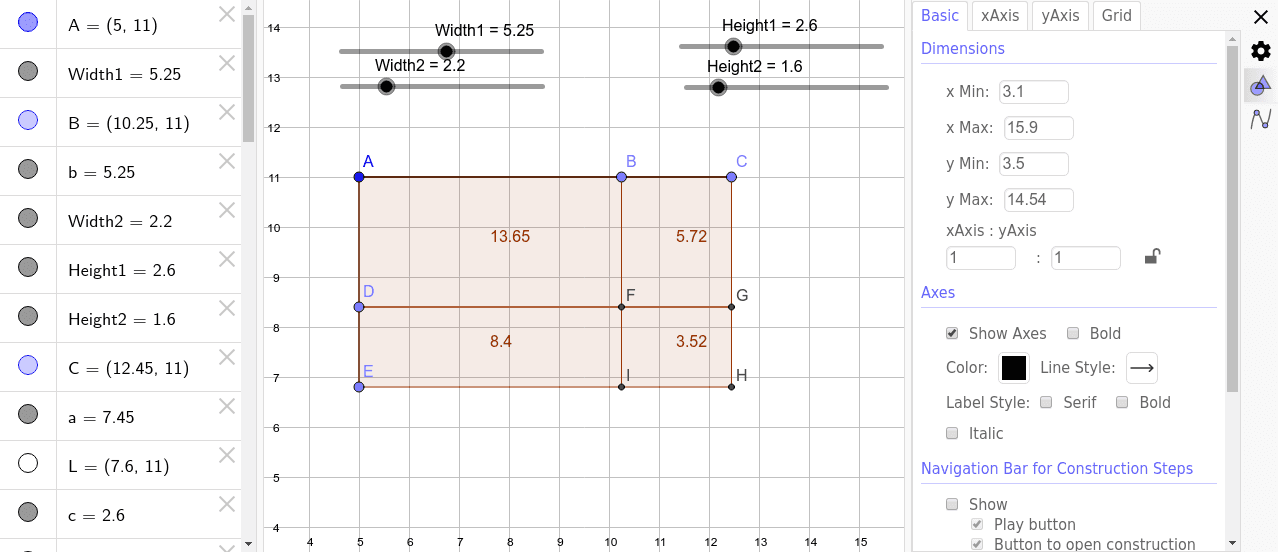
This example demonstrates the multiplication box method, a visual approach to multiplication. Key mathematical concepts include multiplication of natural numbers. Using GeoGebra commands such as Point, Segment, Rotate, etc., a multiplication box is constructed. Suitable for upper elementary or lower middle school students to learn multiplication.
GeoGebra Commands & Parameters
Point(Circle[A, Width1]) → BSegment(A, B) → bPoint(Circle[A, Width1 + Width2]) → CSegment(A, C) → aPoint(Circle[A, Height1]) → LSegment(A, L) → cPoint(Circle[A, Height1 + Height2]) → MSegment(A, M) → M_1Rotate(L, 270*°, A) → DRotate(M, 270*°, A) → EOrthogonalLine(C, a) → dOrthogonalLine(B, b) → eSegment(A, D) → fSegment(D, E) → gSegment(B, C) → hOrthogonalLine(D, f) → iOrthogonalLine(E, f) → jIntersect(e, i) → FIntersect(d, i) → GIntersect(d, j) → HIntersect(e, j) → IPolygon(A, B, F, D) → poly1, a_1, b_1, f_1, d_1Polygon(D, F, I, E) → poly2, d_2, f_2, i_1, e_1Polygon(B, C, G, F) → poly3, b_2, c_1, g_1, f_3Polygon(F, G, H, I) → poly4, f_4, g_2, h_1, i_2