
Movement of a Bug on a Toothpaste Box
Loading the math board and drawing, please wait…
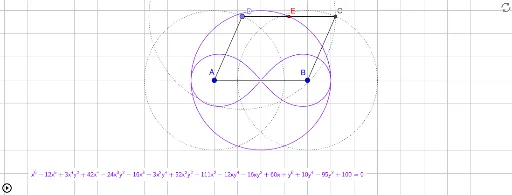
This example demonstrates the movement path of a bug on a toothpaste box. Key mathematical concepts include coordinate geometry, parametric curves, and median value. Using GeoGebra commands such as Segment, Circle, Point, Intersect, Midpoint, LocusEquation, and PathParameter, the path of the bug can be constructed. Suitable for students at the junior high school level and above to learn geometric construction and parametric equations.
GeoGebra Commands & Parameters
Segment(G, H) → CDSegment(E_1, F) → ADSegment(C_1, D_1) → BCCircle(B, BC) → cCircle(A, AD) → dPoint(d) → DCircle(D, CD) → eSegment(A, B) → fIntersect(c, e, i) → CSegment(C, D) → jSegment(A, D) → kMidpoint(j) → ELocusEquation(E, D) → aPathParameter(D) → ppDSegment(C, B) → g
AI Drawing Prompt Reference
Draw a toothpaste box with a bug moving along a specific path. Start by drawing the four corners A, B, C, and D of the box, then draw the connecting sides. Draw a circle c with center B and a circle d with center A. The intersection of circles c and d is point D. Draw another circle e with center D, and draw line segments k (A to D) and j (C to D). The midpoint of line segment j is point E, and the locus of point E is curve a. Finally, draw line segment g (C to B), and the path parameter of point D is ppD.
The prompt above was compiled from the original drawing commands and is for reference only.