
A Geometric Note on Erdős’s Mysterious Remark: Circles and Polygon Structure
Loading the math board and drawing, please wait…
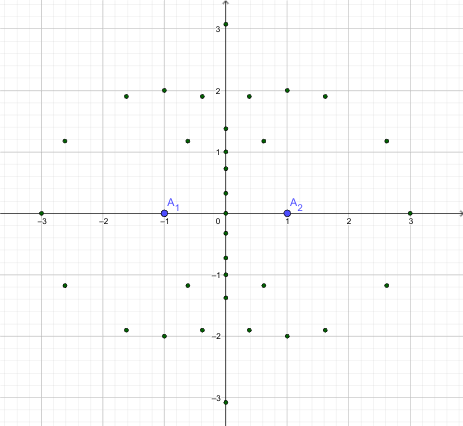
This example demonstrates, through a carefully built planar construction, the geometry–logic connection behind Erdős’s “mysterious remark.” Instead of treating the statement as purely abstract, it uses interactive geometry to make the underlying structure visible: circles and polygons act as constraints that guide how key points and relationships can be assembled and examined. The core mathematical ideas include geometric construction (circle-based layouts and polygonal closures), logical/structural reasoning (how sets of objects constrain outcomes), and the presence of logarithm-related reasoning mentioned in the theme (captured visually through constraints rather than as a standalone computation). Construction-wise, the construction summary indicates the main GeoGebra commands are Circle and Polygon. The objects listed (e.g., l1, l2, l3 … l13) correspond to auxiliary lines or boundaries, while c, d, e, r indicate circle-related elements (such as circles or radii/parameters). Polygons poly1 and poly2 are formed from constructed vertices (A_1, A_2, A, B, C, D, E, F, and others). By selecting and wiring these points into closed polygonal figures under circle constraints, the example produces an interpretable configuration for explanation and classroom discussion. Suitable for high school advanced geometry, contest preparation, and undergraduate explorations of mathematical visualization.
GeoGebra Commands & Parameters
Circle(A_2, A_1) → cCircle(A_1, A_2) → dPolygon(A_1, A_2, 5) → poly1, f, g, h, i, j, A, B, CCircle(A, B, C) → ePolygon(A_2, A_1, 5) → poly2, k, l, m, n, p, D, E, FCircle(E, D, F) → qCircle(((1 / 2 * ((-sqrt(5)) + 1)), sqrt((1 / 2 * ((-sqrt(5)) + 5)))), ((1 / 2 * (sqrt(5) - 1)), sqrt((1 / 2 * ((-sqrt(5)) + 5)))), (0, (-sqrt((-2 * sqrt(5)) + 5)))) → rCircle(((1 / 2 * ((-sqrt(5)) + 1)), (-sqrt((1 / 2 * ((-sqrt(5)) + 5))))), ((1 / 2 * (sqrt(5) - 1)), (-sqrt((1 / 2 * ((-sqrt(5)) + 5))))), (0, sqrt((-2 * sqrt(5)) + 5))) → s
AI Drawing Prompt Reference
Create a geometric composition consisting of multiple circles and polygons. Start by drawing two intersecting circles centered at two base points. Then construct a pentagon using these two points along with three additional vertices, and create a circle passing through three vertices of this pentagon. Repeat this process to form a second pentagonal structure, using points from this new polygon to draw another circle. Finally, add two special circles based on golden ratio values, resulting in a complex geometric configuration where circles and polygons constrain and nest within each other, suitable for mathematical visualization and classroom discussion.
The prompt above was compiled from the original drawing commands and is for reference only.