
More Nets, More Surface Area Practice
Loading the math board and drawing, please wait…
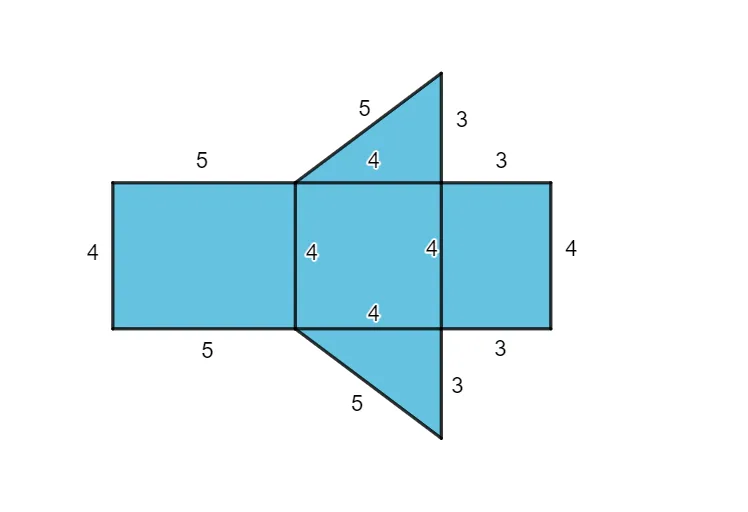
This example demonstrates how to construct and calculate the nets and surface areas of complex geometric solids using GeoGebra. Key math concepts include polygon construction, solid geometry, and surface area calculation. It utilizes commands like CustomQuadrilateral and CustomTriangle, along with objects A, B, C, D, E, F, G, H, q1, f, g, h, i, I, J, q2, j, k, l, m, K, n, p, q, t1, L, r, s, t, t2, M, N, q3, a, b, c, d. Suitable for middle school students and teachers.
GeoGebra Commands & Parameters
CustomQuadrilateral(E, F, G, H) → q1, f, g, h, iCustomQuadrilateral(F, I, J, G) → q2, j, k, l, mCustomTriangle(J, K, G) → n, p, q, t1CustomTriangle(F, I, L) → r, s, t, t2CustomQuadrilateral(I, M, N, J) → q3, a, b, c, d
AI Drawing Prompt Reference
Draw a complex geometric solid, including multiple faces. Start by constructing the first quadrilateral using four connected points, then build upon it by adding new points and lines to form several connected quadrilaterals and triangles, ultimately creating a 3D shape that shows its net (unfolded structure), labeling the shapes and positions of the faces.
The prompt above was compiled from the original drawing commands and is for reference only.