
Mondrian Art Fractions
Loading the math board and drawing, please wait…
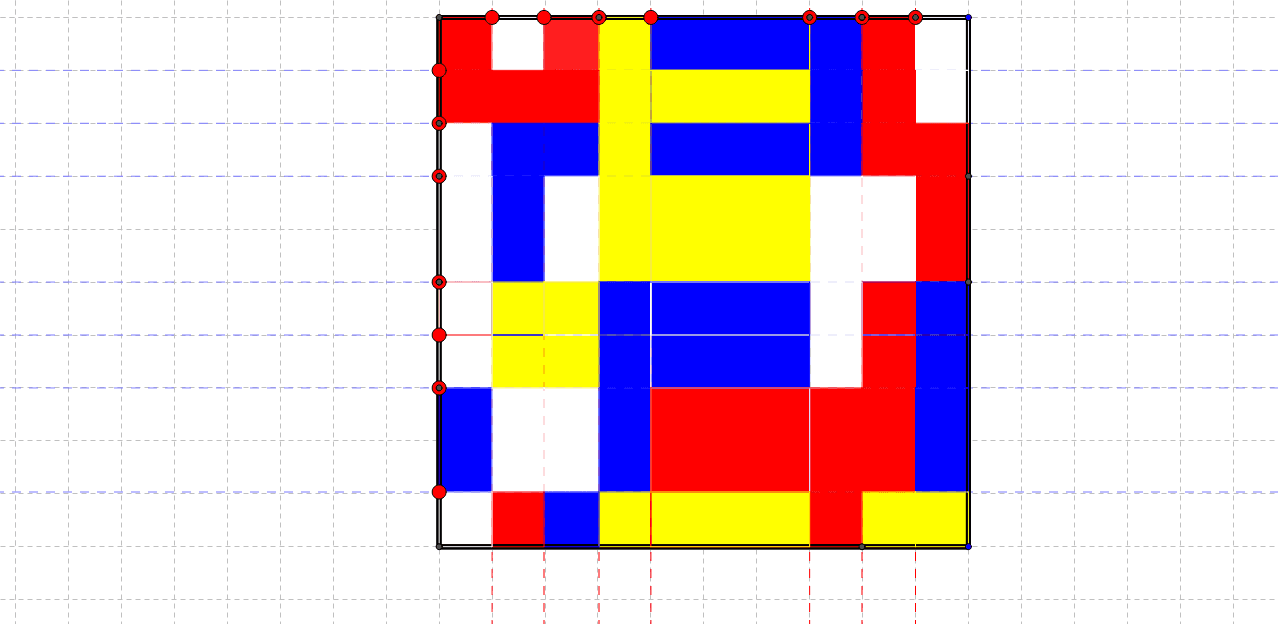
This example demonstrates fractions by allowing users to change the proportions of red, white, blue, and yellow in a dynamic geometric shape. It involves core math concepts like fractions, ratios, and area calculations of geometric figures. Constructed using GeoGebra commands such as Polygon, Point, Line, and Intersect. Suitable for middle school mathematics education.
GeoGebra Commands & Parameters
Polygon(A, B, 4) → poly1, a, b, c, d, C, DPoint(c) → ELine(E, b) → ePolygon(A_1, B_1, 4) → poly1_1, a_1, b_1, c_1, d_1, C_1, D_1Point(c) → FLine(F, e) → fPoint(c) → GLine(G, b) → gPoint(c) → HLine(H, b) → hPoint(c) → ILine(I, b) → iPoint(c) → JLine(J, b) → jPoint(c) → KLine(K, b) → kPoint(b) → LLine(L, c) → lPoint(b) → MLine(M, c) → mPoint(b) → NLine(N, c) → nPoint(b) → OLine(O, c) → pPoint(b) → PLine(P, c) → qPoint(b) → QLine(Q, a) → rPoint(b) → RLine(R, a) → sIntersect(j, l) → SIntersect(j, m) → TIntersect(j, n) → UIntersect(j, p) → VIntersect(j, q) → WIntersect(r, j) → ZIntersect(s, j) → F_1Intersect(s, poly1) → G_1, H_1Intersect(h, s) → I_1Intersect(r, h) → J_1Intersect(h, q) → K_1Intersect(h, poly1) → L_1, M_1Intersect(p, h) → N_1Intersect(h, n) → O_1Intersect(h, m) → P_1Intersect(h, l) → Q_1Intersect(e, l) → R_1Intersect(e, m) → S_1Intersect(e, n) → T_1Intersect(e, p) → U_1Intersect(e, q) → V_1Intersect(e, r) → W_1Intersect(e, s) → Z_1Intersect(s, g) → A_2Intersect(r, g) → B_2Intersect(g, q) → C_2Intersect(p, g) → D_2Intersect(n, g) → E_2Intersect(g, m) → F_2Intersect(g, l) → G_2Intersect(f, l) → H_2Intersect(f, poly1) → I_2, J_2Intersect(m, f) → K_2Intersect(f, n) → L_2Intersect(p, poly1) → M_2, N_2Intersect(p, f) → O_2Intersect(f, poly1) → P_2, Q_2Intersect(q, f) → R_2Intersect(r, f) → S_2Intersect(s, f) → T_2Intersect(s, i) → U_2Intersect(r, i) → V_2Intersect(q, i) → W_2Intersect(p, i) → Z_2Intersect(n, poly1) → A_3, B_3Intersect(i, poly1) → C_3, D_3Intersect(n, i) → E_3Intersect(i, m) → F_3Intersect(i, l) → G_3Intersect(l, k) → H_3Intersect(m, k) → I_3Intersect(n, k) → J_3Intersect(p, k) → K_3Intersect(q, k) → L_3Intersect(r, poly1) → M_3, N_3Intersect(r, poly1) → O_3, P_3Intersect(k, r) → Q_3Intersect(k, s) → R_3Intersect(m, d) → S_3Intersect(l, d) → T_3Intersect(q, d) → U_3Intersect(e, a) → V_3Intersect(j, a) → W_3Intersect(e, poly1) → Z_3, A_4Intersect(g, a) → B_4Intersect(k, a) → C_4Polygon(C, L, S, J) → poly2, c_2, l_1, s_1, j_1Polygon(L, M, T, S) → poly3, l_2, m_1, t, s_2Polygon(M, N, U, T) → poly4, m_2, n_1, u, t_1Polygon(N, O, V, U) → poly5, n_2, o, v, u_1Polygon(O, P, W, V) → poly6, o_1, p_1, w, v_1Polygon(P, Q, Z, W) → poly7, p_2, q_1, z, w_1Polygon(Q, R, F_1, Z) → poly8, q_2, r_1, f_1, z_1Polygon(R, B, W_3, F_1) → poly9, r_2, b_2, w_3, f_2Polygon(W_3, F_1, I_1, L_1) → poly10, w_2, f_3, i_1, l_3Polygon(F_1, Z, J_1, I_1) → poly11, f_4, z_2, j_2, i_2Polygon(W, Z, J_1, K_1) → poly12, w_4, z_3, j_3, k_1Polygon(W, K_1, N_1, V) → poly13, w_5, k_2, n_3, v_2Polygon(V, U, O_1, N_1) → poly14, v_3, u_2, o_2, n_4Polygon(U, T, P_1, O_1) → poly15, u_3, t_2, p_3, o_3Polygon(T, S, Q_1, P_1) → poly16, t_3, s_3, q_3, p_4Polygon(S, J, H, Q_1) → poly17, s_4, j_4, h_1, q_4Polygon(Q_1, R_1, E, H) → poly18, q_5, r_3, e_2, h_2Polygon(Q_1, P_1, S_1, R_1) → poly19, q_6, p_5, s_5, r_4Polygon(P_1, O_1, T_1, S_1) → poly20, p_6, o_4, t_4, s_6Polygon(O_1, N_1, U_1, T_1) → poly21, o_5, n_5, u_4, t_5Polygon(N_1, K_1, V_1, U_1) → poly22, n_6, k_3, v_4, u_5Polygon(K_1, J_1, W_1, V_1) → poly23, k_4, j_5, w_6, v_5Polygon(J_1, I_1, Z_1, W_1) → poly24, j_6, i_3, z_4, w_7Polygon(I_1, L_1, V_3, Z_1) → poly25, i_4, l_4, v_6, z_5Polygon(V_3, B_4, A_2, Z_1) → poly26, v_7, b_4, a_2, z_6Polygon(Z_1, W_1, B_2, A_2) → poly27, z_7, w_8, b_3, a_3Polygon(W_1, V_1, C_2, B_2) → poly28, w_9, v_8, c_3, b_5Polygon(V_1, C_2, D_2, U_1) → poly29, v_9, c_4, d_2, u_6Polygon(U_1, T_1, E_2, D_2) → poly30, u_7, t_6, e_3, d_3Polygon(T_1, S_1, F_2, E_2) → poly31, t_7, s_7, f_5, e_4Polygon(S_1, R_1, G_2, F_2) → poly32, s_8, r_5, g_2, f_6Polygon(R_1, E, G, G_2) → poly33, r_6, e_5, g_1, g_3Polygon(G_2, H_2, F, G) → poly34, g_4, h_3, f_7, g_5Polygon(G_2, F_2, K_2, H_2) → poly35, g_6, f_8, k_5, h_4Polygon(F_2, E_2, L_2, K_2) → poly36, f_9, e_6, l_5, k_6Polygon(E_2, D_2, O_2, L_2) → poly37, e_7, d_4, o_6, l_6Polygon(D_2, C_2, R_2, O_2) → poly38, d_5, c_5, r_7, o_7Polygon(C_2, B_2, S_2, R_2) → poly39, c_6, b_6, s_9, r_8Polygon(B_2, A_2, T_2, S_2) → poly40, b_7, a_4, t_8, s_{10}Polygon(A_2, B_4, I_2, T_2) → poly41, a_5, b_8, i_5, t_9Polygon(I_2, C_3, U_2, T_2) → poly42, i_6, c_7, u_8, t_{10}Polygon(T_2, S_2, V_2, U_2) → poly43, t_{11}, s_{11}, v_{10}, u_9Polygon(S_2, R_2, W_2, V_2) → poly44, s_{12}, r_9, w_{10}, v_{11}Polygon(R_2, O_2, Z_2, W_2) → poly45, r_{10}, o_8, z_8, w_{11}Polygon(O_2, L_2, E_3, Z_2) → poly46, o_9, l_7, e_8, z_9Polygon(L_2, E_3, F_3, K_2) → poly47, l_8, e_9, f_{10}, k_7Polygon(K_2, F_3, G_3, H_2) → poly48, k_8, f_{11}, g_7, h_5Polygon(H_2, G_3, I, F) → poly49, h_6, g_8, i_7, f_{12}Polygon(G_3, H_3, K, I) → poly50, g_9, h_7, k_9, i_8Polygon(G_3, F_3, I_3, H_3) → poly51, g_{10}, f_{13}, i_9, h_8Polygon(E_3, J_3, I_3, F_3) → poly52, e_{10}, j_7, i_{10}, f_{14}Polygon(E_3, Z_2, K_3, J_3) → poly53, e_{11}, z_{10}, k_{10}, j_8Polygon(Z_2, W_2, L_3, K_3) → poly54, z_{11}, w_{12}, l_9, k_{11}Polygon(W_2, V_2, Q_3, L_3) → poly55, w_{13}, v_{12}, q_7, l_{10}Polygon(V_2, U_2, R_3, Q_3) → poly56, v_{13}, u_{10}, r_{11}, q_8Polygon(U_2, C_3, C_4, R_3) → poly57, u_{11}, c_8, c_9, r_{12}Polygon(C_4, R_3, G_1, A) → poly58, c_{10}, r_{13}, g_{11}, a_6Polygon(R_3, Q_3, M_3, G_1) → poly59, r_{14}, q_9, m_3, g_{12}Polygon(Q_3, M_3, U_3, L_3) → poly60, q_{10}, m_4, u_{12}, l_{11}Polygon(L_3, K_3, N_2, U_3) → poly61, l_{12}, k_{12}, n_7, u_{13}Polygon(K_3, J_3, B_3, N_2) → poly62, k_{13}, j_9, b_9, n_8Polygon(J_3, I_3, S_3, B_3) → poly63, j_{10}, i_{11}, s_{13}, b_{10}Polygon(I_3, H_3, T_3, S_3) → poly64, i_{12}, h_9, t_{12}, s_{14}Polygon(H_3, K, D, T_3) → poly65, h_{10}, k_{14}, d_6, t_{13}
AI Drawing Prompt Reference
Draw a quadrilateral and then randomly draw multiple quadrilaterals inside it, with each quadrilateral being partially divided into smaller quadrilaterals. Use red, white, blue, and yellow to fill these quadrilaterals, with proportions that can be adjusted. Finally, connect the sides of these quadrilaterals with intersection points to form a complex geometric pattern.
The prompt above was compiled from the original drawing commands and is for reference only.