
Modular Multiplication in a Square with Inversion
Loading the math board and drawing, please wait…
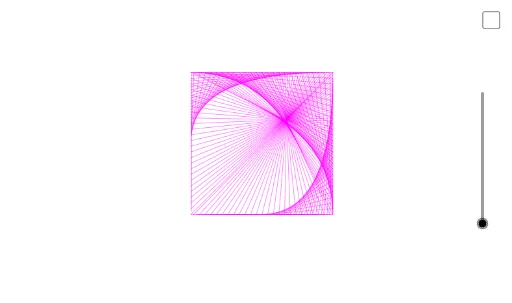
This example demonstrates modular multiplication in a square with inversion, combining geometry and functions. Key mathematical concepts include modular arithmetic, function graphs, and geometric transformations. Construction involves GeoGebra commands like Polygon, Sequence, Join, Length, Circle, and Mirror. Suitable for high school students or college students learning geometric and functional mathematics.
GeoGebra Commands & Parameters
Polygon(A, B, 4) → poly1, f, g, h, i, C, DSequence(A + (w * (B - A)), w, 0, 1, 1 / 50) → L_1Sequence(B + (w * (C - B)), w, 0, 1, 1 / 50) → L_2Sequence(C + (w * (D - C)), w, 0, 1, 1 / 50) → L_3Sequence(D + (w * (A - D)), w, 0, 1, 1 / 50) → L_4Join({L_1, L_2, L_3, L_4}) → L_5Join(Sequence[L_5, w, 1, n]) → L_6Sequence(Segment[L_5(w), L_6((n * w))], w, 1, Length[L_5]) → L_7Length(L_6) → aLength(L_5) → bCircle((0, -1), (1, 0), (0, 1)) → cMirror(L_7, c) → L_8
AI Drawing Prompt Reference
Draw a square and divide each side into 50 equal parts to obtain equally spaced points along its perimeter. Pair the points according to a given modulus n, connecting each pair with a segment. Then construct the unit circle centered at the origin passing through (0,-1), (1,0), and (0,1), and invert all the segments in this circle to produce the final figure.
The prompt above was compiled from the original drawing commands and is for reference only.