
Model for Subtracting Negatives
Loading the math board and drawing, please wait…
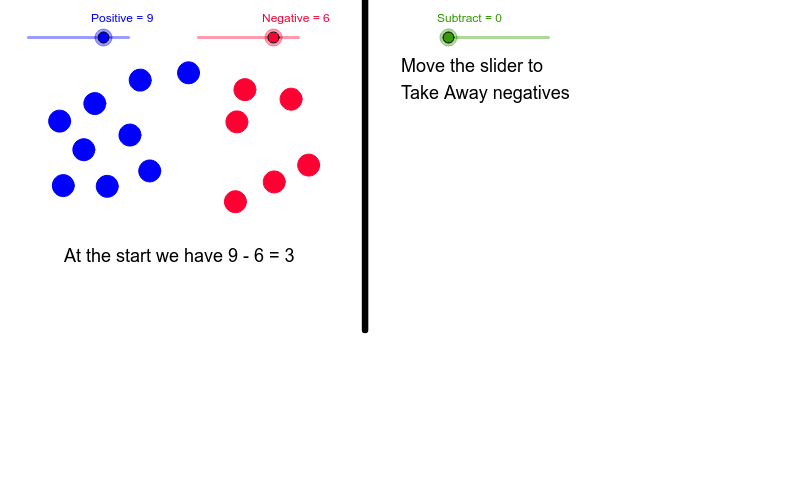
This example demonstrates subtracting negative integers through a visual model, providing an alternative to number line methods. It involves core math concepts like negative operations, vector subtraction, and geometric transformations. Constructed using GeoGebra commands like Circle, Vector, Translate, and Segment, it is suitable for middle school mathematics education to help students intuitively grasp the essence of subtracting negatives.
GeoGebra Commands & Parameters
Circle(H, 0.3) → cCircle(I, 0.3) → dCircle(A, 0.3) → eCircle(C, 0.3) → fCircle(B, 0.3) → gCircle(F, 0.3) → hCircle(D, 0.3) → kCircle(P, 0.3) → pCircle(E, 0.3) → qCircle(G, 0.3) → rCircle(N, 0.3) → sCircle(L, 0.3) → tCircle(K, 0.3) → c1Circle(O, 0.3) → d1Circle(M, 0.3) → e1Circle(J, 0.3) → f1Circle(S, 0.3) → q1Circle(U, 0.3) → t1Circle(T, 0.3) → g1Circle(R, 0.3) → h1Vector(Q, V) → uTranslate(r, u) → r'Translate(k, u) → k'Translate(p, u) → p'Translate(q, u) → q'Translate(q1, u) → q1'Translate(s, u) → s'Translate(t, u) → t'Translate(t1, u) → t1'Segment(W, A1) → a
AI Drawing Prompt Reference
Draw circles with radius 0.3 centered at points H, I, A, C, B, F, D, P, E, G, N, L, K, O, M, J, S, U, T, R. Then draw vector QV and translate circles K, P, Q, Q1, S, T, T1 along vector QV. Finally, draw line segment WA.
The prompt above was compiled from the original drawing commands and is for reference only.