
Missing Supplementary Angle: Geometric Construction and Angle Practice
Loading the math board and drawing, please wait…
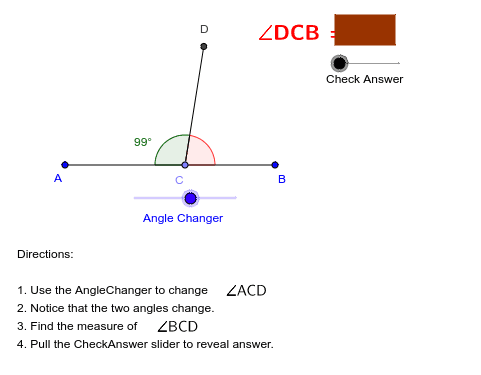
This GeoGebra example demonstrates how to construct adjacent supplementary angles and solve for a missing angle when one angle is given. Core mathematical concepts include the definition of supplementary angles (two angles summing to 180°), angle measurement, and basic polygonal geometry. The construction uses Segment to draw lines, Point to place vertices, Rotate to transform points, Angle to label angles β and γ, Polygon to form closed shapes, and Vector together with Translate to shift figures and generate transformed objects such as E, F, G, H. A CheckAnswer object is included for interactive verification. Suitable for middle school geometry lessons (grades 7–9), classroom activities, or independent practice exploring supplementary angle properties.
GeoGebra Commands & Parameters
Segment(A, B) → aPoint(a) → CRotate(A, -AngleChanger, C) → DAngle(D, C, A) → βSegment(C, D) → bAngle(B, C, D) → γPolygon(E, F, G, H) → P, e, f, g, hVector((0, 0), (CheckAnswer, 0)) → uTranslate(E, u) → E'Translate(F, u) → F'Translate(G, u) → G'Translate(H, u) → H'Polygon(E', F', G', H') → P', e', f', g', h'
AI Drawing Prompt Reference
Draw a horizontal line segment with a point on it as a common vertex. From this point, draw a ray to one side, creating two adjacent angles. One angle is given, the other is unknown, and they sum to 180 degrees. Mark both angles with arcs and label them as beta and gamma. Then draw a quadrilateral and translate it horizontally by a certain distance to get a congruent copy, for comparison or verification.
The prompt above was compiled from the original drawing commands and is for reference only.