
Midpoint Coordinates: Check for Understanding
Loading the math board and drawing, please wait…
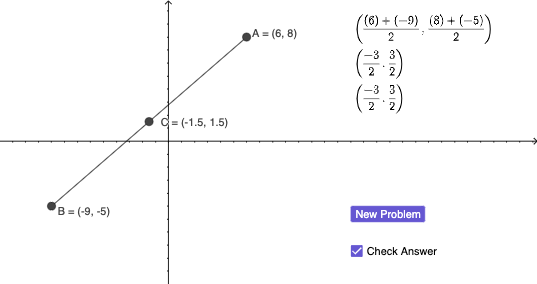
This GeoGebra example demonstrates the calculation of midpoint coordinates for a segment in a coordinate plane, designed as an interactive check-for-understanding activity. The core mathematical concept is the midpoint formula from coordinate geometry, where the midpoint's coordinates are the averages of the corresponding endpoint coordinates. The construction uses the Midpoint command to create the midpoint, the Segment command to draw the segment, and defines points A, B, and C (with C as the midpoint). It also includes a text object (text1) to display coordinates or prompts, and a button (button1) to trigger checking or resetting. This resource is suitable for middle or high school students learning about the Cartesian plane and segment properties, and can be used for formative assessment or self-paced practice to reinforce understanding of the midpoint formula.
GeoGebra Commands & Parameters
Midpoint(B, A) → CSegment(B, A) → f
AI Drawing Prompt Reference
Draw a line segment on a coordinate plane, mark two endpoints, and calculate the midpoint. Ensure the midpoint is centered on the segment and display coordinates with text. Provide a button to check or reset the graph.
The prompt above was compiled from the original drawing commands and is for reference only.