
Measuring Angles Using a Protractor
Loading the math board and drawing, please wait…
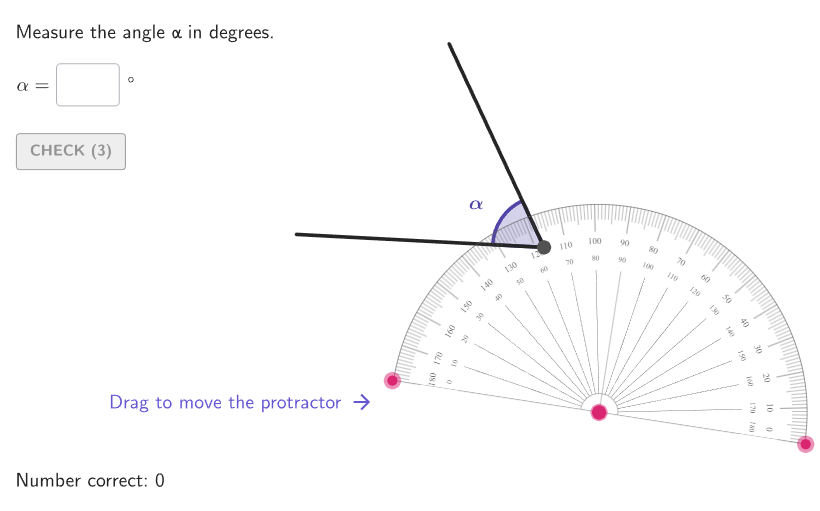
This activity demonstrates how to measure angles using an interactive protractor, helping students understand angle concepts. Key math concepts include angle measurement, the relationship between a circle and 360 degrees, and using a protractor for construction. Construction involves generating random angles with RandomUniform, creating circles and arcs with Circle and Arc, finding intersections with Intersect, and calculating angles with Angle. Suitable for grades 4-5 for geometry practice.
GeoGebra Commands & Parameters
RandomUniform(0, 0.99, 200) → allRandomSeeds, {0.3153404677866415, 0.2761555169423194, 0.3107770875263359, 0.677084696361758, 0.7711339551623652, 0.22401862397786385, 0.8305783734272846, 0.06586948122677139, 0.5067891915923397, 0.07040804772100806, 0.5032405376638666, 0.18181022590448992, 0.4119110421418313, 0.08824550060838025, 0.617530791311082, 0.8299220377332805, 0.26189776416289, 0.7082508073852819, 0.20034052761200716, 0.27634733891650715, 0.7065204704600381, 0.5715027076861465, 0.06449177381469354, 0.5004248624241231, 0.8773993607003989, 0.9417152117654609, 0.7581219052018994, 0.11329066829989054, 0.2523744153636917, 0.43121084904657214, 0.7666866021552664, 0.17390143978734085, 0.3407741212453228, 0.4901878659865966, 0.5732203812850767, 0.06132996277468569, 0.7142791579524791, 0.7966810606495088, 0.2667809929483873, 0.5073293608501617, 0.8434590422508866, 0.9846057223707958, 0.722978918675853, 0.4554959977031624, 0.6501275721433464, 0.47945258070507724, 0.7741549872154234, 0.3128829602431588, 0.030419526730461378, 0.575566589906839, 0.4801191437813745, 0.46662485561915046, 0.15293367306288239, 0.9054946538807047, 0.34339982440327477, 0.7420310309146892, 0.1604184807470226, 0.5706286398358144, 0.3556789056448599, 0.419688624471129, 0.6122952640024399, 0.053296725777257754, 0.6244986034387887, 0.19738782862195228, 0.29881900997549216, 0.1435720392642982, 0.8714265354817534, 0.248141258626811, 0.9758708112715684, 0.5693700909341133, 0.20465222987915743, 0.008215641021643188, 0.2722567590046559, 0.9458964237384749, 0.36046321910123497, 0.8789276580239742, 0.058956045630929176, 0.06018439734544442, 0.2292106766926932, 0.562977789957197, 0.8120175119210471, 0.13832734806680183, 0.2922239836602859, 0.7403048506607037, 0.8377466187942876, 0.11706265019242548, 0.7266715224240169, 0.5098400245943854, 0.40045623698690846, 0.10760556647003376, 0.13558852674088548, 0.622123562468114, 0.039372557091220756, 0.5880578743631648, 0.9602058901670252, 0.003519033856835777, 0.4722935258779893, 0.021332170705090057, 0.6513127063687548, 0.6657181229972157, 0.04929059736966722, 0.3083351596018909, 0.5456730503725673, 0.31437647100165317, 0.18012520460917658, 0.9511432675918595, 0.1024915732887048, 0.23805417851104094, 0.2141200955974338, 0.008082343748174894, 0.30358482143644366, 0.2831569016154951, 0.7909811182462398, 0.11198749750419179, 0.7892651107905221, 0.802281548699482, 0.10550870388290698, 0.39447279974509636, 0.07998018284605468, 0.25226798673445544, 0.42826910994215694, 0.5027799941173501, 0.0014773052378315743, 0.2643413666845887, 0.038113646519507396, 0.5317037810311536, 0.9186716847718766, 0.5920016737957783, 0.7109401447637769, 0.11120602058849893, 0.12049973472209356, 0.19277584905603082, 0.22228448835506548, 0.9006338721316506, 0.40482388448022016, 0.007594448962134019, 0.5592101784110244, 0.3329479045907266, 0.5789305276524921, 0.03638869231287667, 0.17953336623607938, 0.917042667140994, 0.9373254745902747, 0.050525268628911206, 0.20367527450001174, 0.2431086327704482, 0.9643795615326588, 0.23190520218709584, 0.2963787759820529, 0.7350365400828499, 0.44491553270591055, 0.724949747356566, 0.07215541561468977, 0.03510543938177135, 0.2510509823933041, 0.7012800268316668, 0.7096484947079101, 0.5796236224635164, 0.6485247977095391, 0.04766871108932252, 0.26610316512289106, 0.559806963573839, 0.160333774986281, 0.2958012389210338, 0.883827930103703, 0.009981461073502049, 0.8997934570271998, 0.7675299068084322, 0.6459131191584075, 0.005187523990901387, 0.10911169286747255, 0.02163914659595278, 0.5185397051479285, 0.752441054062571, 0.32322573793796483, 0.9676608668401684, 0.801968136115234, 0.8842715614598213, 0.16200293179851058, 0.25898814311205837, 0.6917402756666605, 0.1597103326591322, 0.5469426323392603, 0.9614320361379769, 0.42575789212365794, 0.1566420565873819, 0.9312410547487384, 0.2544502480389602, 0.4317198686596733, 0.2203607496788616, 0.5644935569903544, 0.7305477550748453, 0.8429064210771313, 0.8962862754611663, 0.5054076773206954, 0.49380858348452505, 0.9884912068823967, 0.8601004626296941, 0.26768797622654766, 0.02116433145858384}Sequence(10, 175, 1) → anglesTake(allRandomSeeds, randIndex, randIndex + numRandoms - 1) → currentRandomSeedsElement(angles, randomNum1) → randomAngleCircle(ProtractorCenter_{1}, r) → ProtractorCircle_{1}Point(ProtractorCircle_{1}) → ProtractorLeft_{1}DynamicCoordinates(ProtractorLeft_{1}, x(ProtractorLeft_{1}), y(ProtractorLeft_{1})) → ProtractorLeftDyn_{1}Point(ProtractorCircle_{1}) → ProtractorRight_{1}DynamicCoordinates(ProtractorRight_{1}, x(ProtractorRight_{1}), y(ProtractorRight_{1})) → ProtractorRightDyn_{1}Arc(ProtractorCircle_{1}, ProtractorRightDyn_{1}, ProtractorLeftDyn_{1}) → cIntersect(c, LineBisector[ProtractorRightDyn_{1}, ProtractorLeftDyn_{1}]) → D, ESequence(((2 * cos(ii)), (2 * sin(ii))), ii, 5°, 360°, 2°) → PointsRaysTextfield(input1) → InputBox1Corner(5) → layoutAppSizesectorPixels(A, B, C, haloPixels + 40, Corner[1], Corner[3], Corner[5]) → pulsingObjectsectorPixels(A, B, C, 40, Corner[1], Corner[3], Corner[5]) → displayAnglePointToPixels(Corner[onboardingDisplayText, 2], Corner[1], Corner[3], Corner[5]) → layoutOnboardingonboardingTextOffset(Corner[onboardingText, 1], Corner[onboardingText, 3], onboardingCase, Corner[1], Corner[3], Corner[5]) → OnboardingTextOffsetElement(PointsRays, randomNum2) → EndPointRay1Rotate(EndPointRay1, randomAngle°) → EndPointRay2Polygon({(-4.5, -3.7), (4.5, -3.7), (4.5, 3.7), (-4.5, 3.7)}) → graphicAreaIntersectPath(Ray[Center, EndPointRay1], graphicArea) → Ray1IntersectPath(Ray[Center, EndPointRay2], graphicArea) → Ray2Angle(Vector[EndPointRay1], Vector[EndPointRay2]) → angleToShowDilate(Rotate[EndPointRay1, (angleToShow * If[randomAngle ≤ 25, 2, 0.5])], If[randomAngle ≤ 25, 0.5, 0.75]) → LabelPosAngleToShowMin(Angle[Vector[EndPointRay1], Vector[(1, 0)]], Angle[Vector[(1, 0)], Vector[EndPointRay1]]) → rotAngleRightProtMin(Angle[Vector[EndPointRay2], Vector[(-1, 0)]], Angle[Vector[(-1, 0)], Vector[EndPointRay2]]) → rotAngleLeftProtIf(x(D) ≥ 0 ∧ y(D) ≥ 0, 1, x(D) < 0 ∧ y(D) ≥ 0, 2, x(D) < 0 ∧ y(D) < 0, 3, 4) → quadrantProtractorCenterIf(quadrantProtractorCenter ≟ 4, 2, quadrantProtractorCenter ≟ 2, 4, quadrantProtractorCenter ≟ 3, 1, 3) → quadrantLegendElement(LegendPositions, quadrantLegend) → Legend2Translate(Legend1, (0, -0.5)) → Legend3Translate(Legend2, (0, -0.5)) → Legend4Segment(Legend2, Legend1) → segmentLegendCorrectSegment(Legend4, Legend3) → segmentLegendIncorrectText("\textsf{ Correct solution\\}", Legend1, true, true, If[2 ≤ quadrantLegend ≤ 3, -1, 1], 0) → legendCorrectText("\textsf{ Your solution\\}", Legend3, true, true, If[2 ≤ quadrantLegend ≤ 3, -1, 1], 0) → legendIncorrectDilate(If[RotateRight, EndPointRay2, EndPointRay1], r / 2) → EndCorrectArcDilate(If[RotateRight, EndPointRay1, EndPointRay2], r / 2) → IniCorrectArcArc(x^(2) + y^(2) = Distance[Center, IniCorrectArc]^(2), IniCorrectArc, EndCorrectArc) → correctArc1Arc(x^(2) + y^(2) = Distance[Center, IniCorrectArc]^(2), EndCorrectArc, IniCorrectArc) → correctArc2Dilate(IniCorrectArc, 1.02) → IniIncorrectArcRotate(IniIncorrectArc, (input1° * If[RotateRight, 1, -1])) → EndIncorrectArcArc(x^(2) + y^(2) = Distance[Center, IniIncorrectArc]^(2), IniIncorrectArc, EndIncorrectArc) → incorrectArc1Arc(x^(2) + y^(2) = Distance[Center, IniIncorrectArc]^(2), EndIncorrectArc, IniIncorrectArc) → incorrectArc2Segment(Center, EndIncorrectArc) → segmentIncorrectText((input1 * "°"), (x(Dilate[EndIncorrectArc, 1.1]), Max[y(Dilate[EndIncorrectArc, 1.1]), -3.55]), true, true, 0, 0) → labelPointIncorrectRotate(IniCorrectArc, ((animCurve * randomAngle°) * If[RotateRight, 1, -1])) → IniCorrectArc'Arc(x^(2) + y^(2) = Distance[Center, IniCorrectArc]^(2), IniCorrectArc, IniCorrectArc') → arcAnim1Arc(x^(2) + y^(2) = Distance[Center, IniCorrectArc]^(2), IniCorrectArc', IniCorrectArc) → arcAnim2Text(("\alpha" * If[showsolution ∧ step ≟ 0 ∨ step ≟ 3 ∧ animCurve ≟ 1, (("=" * randomAngle) * "°"), ""]), LabelPosAngleToShow, true, true, 0, 0) → labelAngleToShowcirclePixels(ProtractorLeftDyn_{1}, 5 + (7 * pulsing), Corner[1], Corner[3], Corner[5]) → pulsingObjectLeftcirclePixels(ProtractorRightDyn_{1}, 5 + (7 * pulsing), Corner[1], Corner[3], Corner[5]) → pulsingObjectRightcirclePixels(ProtractorCenter_{1}, 5 + (7 * pulsing), Corner[1], Corner[3], Corner[5]) → pulsingObjectCenter
AI Drawing Prompt Reference
Draw a square working area in the coordinate plane. At a fixed center point, construct two rays so that their endpoints lie on the boundary of the square. Create a protractor-style circular arc that spans between the two rays and includes an angle reading text (linked to a user input angle). Then add a second, “your solution” arc: an arc with the same radius centered at the same point, starting from a reference direction and ending at the position determined by the input angle, with a nearby label showing the input in degrees. Finally overlay a “correct solution” arc: an arc centered at the same point, spanning the actual angle between the two constructed rays, and place an on-screen correct/incorrect text near the legend area.
The prompt above was compiled from the original drawing commands and is for reference only.