
Measures of Spread
Loading the math board and drawing, please wait…
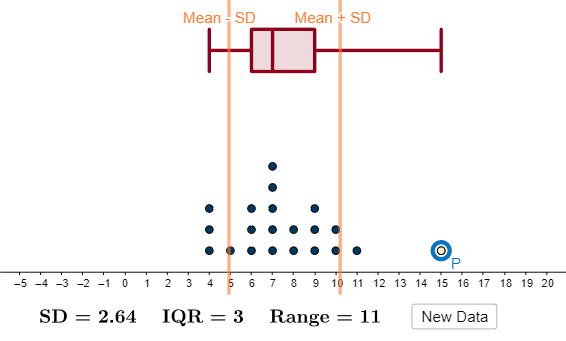
This example demonstrates how to use GeoGebra to create histograms, box plots, and calculate measures of spread such as mean, median, quartiles for a dataset. Core math concepts include statistical characteristics, median value, bar chart, definite integral, and subtraction. It uses commands like Point, Sequence, mean, stdev, Median, Q1, Q3, DotPlot, BoxPlot. Suitable for high school students learning probability and statistics to visualize data distribution and spread.
GeoGebra Commands & Parameters
Point(Segment[(-5, 1), (20, 1)]) → PSequence(RandomBinomial[20, 0.35], a, 1, 20) → list1, {7, 6, 9, 4, 7, 7, 6, 8, 9, 4, 11, 6, 8, 7, 5, 4, 9, 10, 10, 7}mean(Append[list1, x(P)]) → astdev(Append[list1, x(P)]) → bMedian(Append[list1, x(P)]) → dQ1(Append[list1, x(P)]) → eQ3(Append[list1, x(P)]) → fDotPlot(Append[list1, x(P)], 1) → list2BoxPlot(10.5, 1, Append[list1, x(P)]) → c
AI Drawing Prompt Reference
On a single coordinate canvas for statistical spread, draw a horizontal baseline segment with its endpoints. Then generate a list of 20 random discrete samples from a Binomial distribution with n=20 and p=0.35, treating these values as the dataset. Compute the mean, the median, and the first and third quartiles from the dataset. Visualize the distribution with a dot plot (showing the discrete frequencies along the horizontal axis) and also add a box plot that uses the quartiles to define the box location, with the overall scale/range set using the provided box-plot parameter.
The prompt above was compiled from the original drawing commands and is for reference only.