
Maximum Angle Explained: Circle and Tangent Construction
Loading the math board and drawing, please wait…
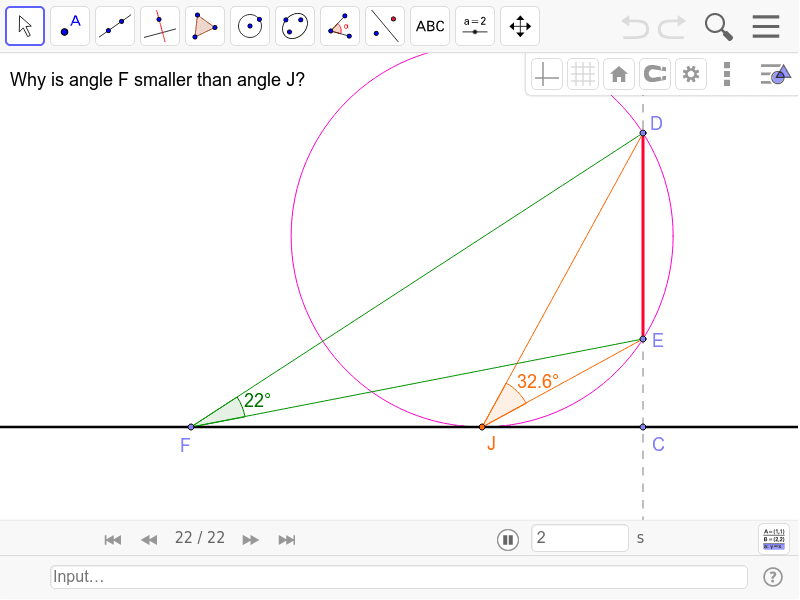
This GeoGebra example dynamically demonstrates how a maximum angle is formed and explained under given geometric conditions. It shows how a circle, tangents, perpendicular lines, and angle bisectors interact to make a specific angle reach its maximum value. Core mathematical concepts involve the inscribed angle theorem, tangent properties, angle bisectors, and optimization thinking. The construction uses commands such as Line, Point, OrthogonalLine, Segment, Angle, LineBisector, Midpoint, Circle, and Intersect, creating objects A, B, C, D, E, F, G, H, I, J, segments a, b, c, d, e, f, g, h, i, j, angles α and β, and intersection point T1. This is suitable for high school or early college students to grasp intuitive proofs of geometric optimization problems, and also serves as a classroom demonstration tool for teachers to link abstract theorems with dynamic visualization.
GeoGebra Commands & Parameters
Line(A, B) → aPoint(a) → COrthogonalLine(C, a) → bPoint(b) → DPoint(b) → EPoint(a) → FSegment(D, F) → cSegment(E, F) → dAngle(E, F, D) → αSegment(D, E) → eLineBisector(e) → fMidpoint(D, E) → GCircle(E, Distance[C, G]) → gIntersect(g, f, 2) → HCircle(H, E) → hIntersect(h, a) → I, JSegment(D, J) → iSegment(J, E) → jAngle(E, J, D) → β
AI Drawing Prompt Reference
Draw a circle with two tangents to demonstrate how the maximum angle is formed through the interaction of a circle, tangents, perpendicular lines, and angle bisectors. Start by drawing a line segment, then find its midpoint and draw a perpendicular line. Next, draw tangents from the endpoints of the segment. Connect the points of intersection to form a triangle, and use an angle bisector to find the maximum angle. Finally, illustrate the optimization process with a circle.
The prompt above was compiled from the original drawing commands and is for reference only.