
Max Bill Painting - by Brândusa Ioan
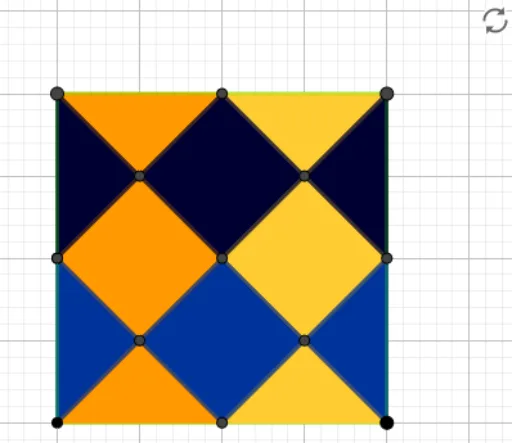
Loading the math board and drawing, please wait…
In collections
Paintings modeled in Geogebra
This example demonstrates how to create Max Bill style paintings through mathematical constructions, showcasing creative applications of geometric shapes and transformations. Core math concepts include equations, similarity transformation, median value, root, and unit circle. Construction highlights involve GeoGebra commands like Point, Polygon, Midpoint, Segment, and Intersect for building complex geometric figures. Suitable for high school and above, ideal for learning geometric constructions and transformation applications.
GeoGebra Commands & Parameters
Point(xAxis) → APolygon(A, B, 4) → poly1, f, g, h, i, C, DMidpoint(i) → EMidpoint(g) → FMidpoint(h) → GMidpoint(f) → HSegment(D, B) → jSegment(C, A) → kSegment(G, F) → lSegment(G, E) → mIntersect(i, m) → ISegment(E, H) → nSegment(H, F) → pIntersect(j, m) → JIntersect(j, k) → KIntersect(k, l) → LIntersect(j, p) → MIntersect(k, n) → NPolygon(J, E, N, K) → q1, j_1, e, n_1, k_1Polygon(D, J, G) → t1, g_1, d, j_2Polygon(A, N, H) → t2, h_1, a, n_2Polygon(G, L, C) → t3, c, g_2, l_1Polygon(L, K, M, F) → q2, l_2, k_2, m_1, f_1Polygon(H, M, B) → t4, b, h_2, m_2Polygon(G, J, K, L) → q3, g_3, j_3, k_3, l_3Polygon(C, F, L) → t5, l_4, c_1, f_2Polygon(D, E, J) → t6, j_4, d_1, e_1Polygon(E, A, N) → t7, n_3, e_2, a_1Polygon(K, N, H, M) → q4, k_4, n_4, h_3, m_3Polygon(F, B, M) → t8, m_4, f_3, b_1