
Matrix Transformations (iPad)
Loading the math board and drawing, please wait…
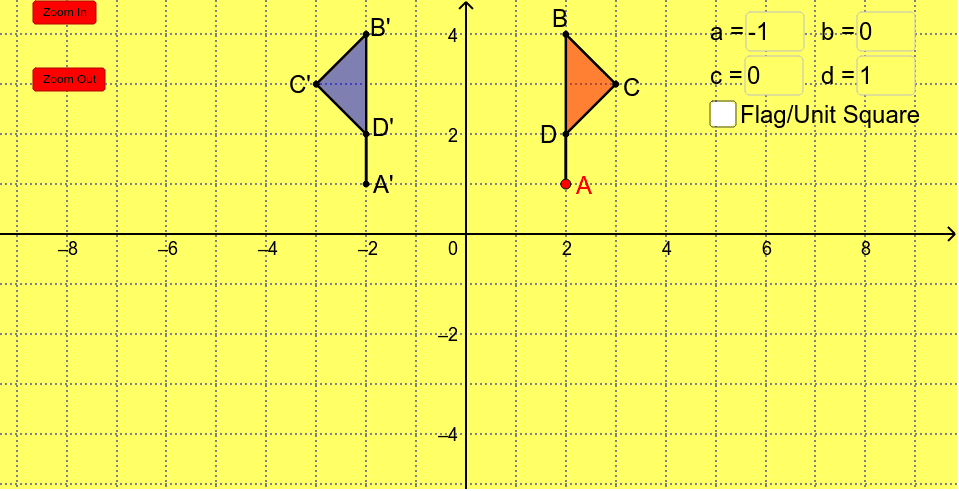
This example demonstrates matrix transformations for tablet use, visually showing how matrices alter the shape and position of geometric figures. Core math concepts include matrix operations, linear transformations, reflections, rotations, and coordinate geometry. It uses GeoGebra commands like Polygon, Textfield, If, and Segment. Suitable for high school and above students to learn and understand the geometric meaning of matrix transformations, as well as for mathematical teaching demonstrations.
GeoGebra Commands & Parameters
Polygon(A, B, C, D) → poly1, seg1, seg2, seg3, seg4Textfield(a) → inputBox1Textfield(b) → inputBox2Textfield(c) → inputBox3Textfield(d) → inputBox4Polygon(A', B', C', D') → poly2, a', b', c', d'If(zoom > 0, 28 * 1.5^(abs(zoom)), If[zoom < 0, 28 * (2 / 3)^(abs(zoom)), 28]) → lengthIf(zoom > 0, 1.5^(abs(zoom)) * (-4), If[zoom < 0, (2 / 3)^(abs(zoom)) * (-4), -4]) → topIf(zoom > 0, 1.5^(abs(zoom)) * (-7), If[zoom < 0, (2 / 3)^(abs(zoom)) * (-7), -7]) → botSegment(I, J) → iSegment(J, K) → jSegment(K, L) → kSegment(L, I) → lSegment(M, N) → mSegment(O, N) → nSegment(O, P) → pSegment(M, P) → q
AI Drawing Prompt Reference
Draw an original polygon formed by four points and display four input boxes for entering the elements of a matrix. Transform the polygon based on the input matrix to show the new transformed polygon. Adjust the length and position of lines inside the polygon dynamically according to the zoom level, and add four auxiliary line segments connecting the diagonals to visualize the effect of matrix transformation.
The prompt above was compiled from the original drawing commands and is for reference only.