
Matrix Multiplication Interactive Demo: Random Matrices and Scaling
Loading the math board and drawing, please wait…
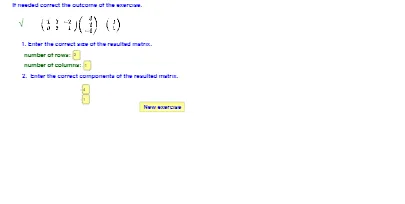
① This GeoGebra example provides an interactive demonstration of matrix multiplication, where users can enter or randomly generate matrix entries and observe the resulting product matrix in real time. ② The core mathematical concepts include matrix multiplication, its relation to linear transformations (particularly dilation/scaling), random number generation, limit ideas through adjustable sliders, and hypergeometric distribution as a probabilistic background. ③ Construction highlights: uses Random command to generate random matrix elements, Sequence to build matrix rows/columns, Textfield and inputBox series for editable inputs, and If for conditional logic; objects include matrices A, B, C, multiple text labels (text1 to text5), and nine input boxes (inputBox1 to inputBox9), with sliders (g, f) controlling parameters. ④ This is ideal for high school to early college students in linear algebra, helping them grasp the rules of matrix multiplication and its geometric interpretation as transformations, and can be used by teachers for classroom demonstrations.
GeoGebra Commands & Parameters
Random(1, 3) → bRandom(1, 3) → cRandom(1, 3) → aSequence(Sequence[Random[-2, 2], j, 1, b], i, 1, a) → ASequence(Sequence[Random[-2, 2], j, 1, c], i, 1, b) → BTextfield(d) → inputBox2Textfield(e) → inputBox3Sequence(Sequence[Cell[j, i], j, 1, e], i, 1, d) → CIf(C ≟ (A * B), 1, 2) → gIf(C ≟ (A * B), 1, 2) → fTextfield(A1) → inputBox1Textfield(B1) → inputBox4Textfield(C1) → inputBox5Textfield(A2) → inputBox6Textfield(B2) → inputBox7Textfield(C2) → inputBox8Textfield(A3) → inputBox9Textfield(B3) → inputBox10Textfield(C3) → inputBox11Sequence(Sequence[Random[-2, 2], j, 1, c], i, 1, b) → matrix1Sequence(Sequence[Random[-2, 2], j, 1, c], i, 1, b) → matrix2Sequence(Sequence[Random[-2, 2], j, 1, c], i, 1, b) → matrix3Sequence(Sequence[Random[-2, 2], j, 1, c], i, 1, b) → matrix4Sequence(Sequence[Random[-2, 2], j, 1, c], i, 1, b) → matrix5Sequence(Sequence[Random[-2, 2], j, 1, c], i, 1, b) → matrix6Sequence(Sequence[Random[-2, 2], j, 1, c], i, 1, b) → matrix7Sequence(Sequence[Random[-2, 2], j, 1, c], i, 1, b) → matrix8Sequence(Sequence[Random[-2, 2], j, 1, c], i, 1, b) → matrix9Sequence(Sequence[Random[-2, 2], j, 1, c], i, 1, b) → matrix10Sequence(Sequence[Random[-2, 2], j, 1, c], i, 1, b) → matrix11Sequence(Sequence[Random[-2, 2], j, 1, c], i, 1, b) → matrix12Sequence(Sequence[Random[-2, 2], j, 1, c], i, 1, b) → matrix13Sequence(Sequence[Random[-2, 2], j, 1, c], i, 1, b) → matrix14Sequence(Sequence[Random[-2, 2], j, 1, c], i, 1, b) → matrix15Sequence(Sequence[Random[-2, 2], j, 1, c], i, 1, b) → matrix16Sequence(Sequence[Random[-2, 2], j, 1, c], i, 1, b) → matrix17Sequence(Sequence[Random[-2, 2], j, 1, c], i, 1, b) → matrix18Sequence(Sequence[Random[-2, 2], j, 1, c], i, 1, b) → matrix19Sequence(Sequence[Random[-2, 2], j, 1, c], i, 1, b) → matrix20Sequence(Sequence[Random[-2, 2], j, 1, c], i, 1, b) → matrix21Sequence(Sequence[Random[-2, 2], j, 1, c], i, 1, b) → matrix22Sequence(Sequence[Random[-2, 2], j, 1, c], i, 1, b) → matrix23Sequence(Sequence[Random[-2, 2], j, 1, c], i, 1, b) → matrix24Sequence(Sequence[Random[-2, 2], j, 1, c], i, 1, b) → matrix25Sequence(Sequence[Random[-2, 2], j, 1, c], i, 1, b) → matrix26Sequence(Sequence[Random[-2, 2], j, 1, c], i, 1, b) → matrix27Sequence(Sequence[Random[-2, 2], j, 1, c], i, 1, b) → matrix28Sequence(Sequence[Random[-2, 2], j, 1, c], i, 1, b) → matrix29Sequence(Sequence[Random[-2, 2], j, 1, c], i, 1, b) → matrix30Sequence(Sequence[Random[-2, 2], j, 1, c], i, 1, b) → matrix31Sequence(Sequence[Random[-2, 2], j, 1, c], i, 1, b) → matrix32Sequence(Sequence[Random[-2, 2], j, 1, c], i, 1, b) → m1Sequence(Sequence[Random[-2, 2], j, 1, c], i, 1, b) → m2
AI Drawing Prompt Reference
Create an interactive graphic for demonstrating matrix multiplication: include two editable 3×1 input matrices (so their product matrix can be computed), and display the resulting 3×3 product matrix in a dedicated grid area. Add several text labels to present the current matrix-multiplication result. Include two slider-controlled parameters whose values can change based on a conditional comparison of the computed product with the displayed result. Initialize the matrix entries with random integers, allow the user to edit individual entries via the input boxes, and keep the product matrix updating in real time as inputs change.
The prompt above was compiled from the original drawing commands and is for reference only.