
Math'art
Loading the math board and drawing, please wait…
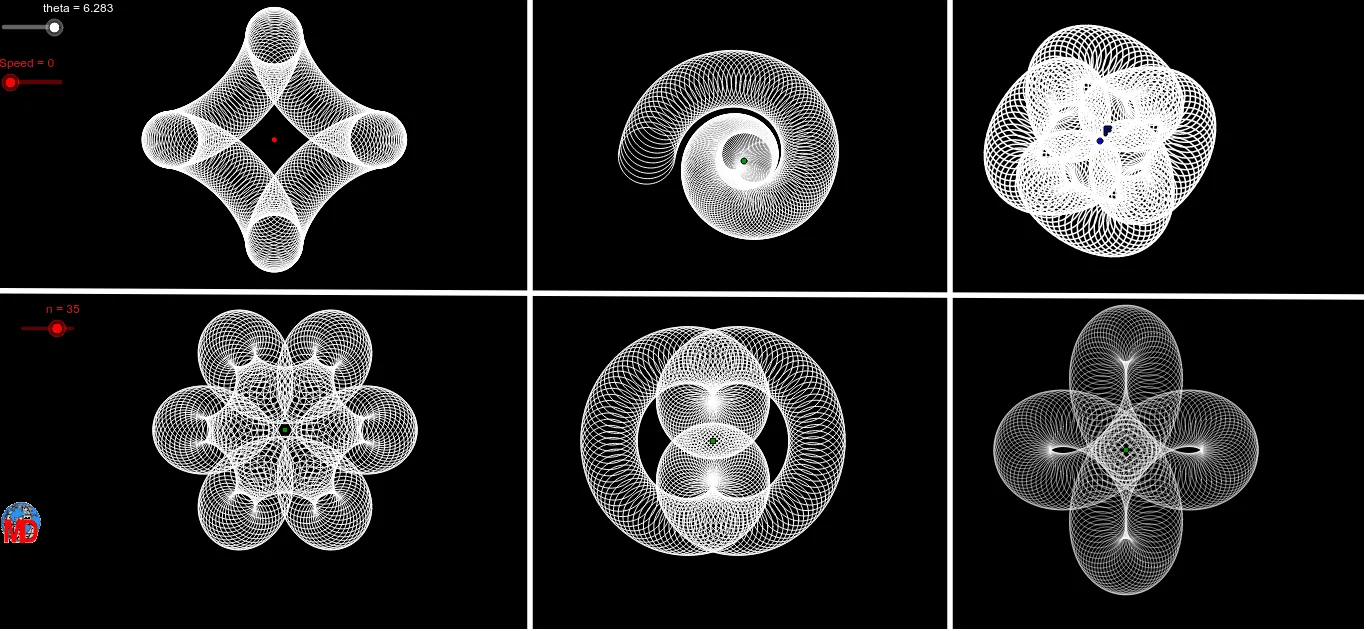
This example demonstrates the creation of artistic patterns through mathematical functions and geometric constructions. It involves core math concepts like function graphing, coordinate geometry, fractal geometry, and probability & statistics. Key GeoGebra commands and objects used include Function, CurveCartesian, Sequence, and Line, as outlined in the construction summary. Suitable for high school students and math enthusiasts exploring the intersection of math and art.
GeoGebra Commands & Parameters
Function((4 * cos((2 * x))), 0, theta) → r_1CurveCartesian((a * sin(t)^(3)), (a * cos(t)^(3)), t, 0, theta) → oSequence((x(A) + (a * sin(t)^(3)), y(A) + (a * cos(t)^(3)) + z(A)), t, 0, theta, 1 / n) → liste1Sequence(Circle[Element[liste1, i], r], i, 1, Length[liste1]) → liste2Sequence((x(B) + ((cos((2 * t)) * a) * cos(t)), y(B) + ((cos((2 * t)) * b) * sin(t))), t, 0, theta, 1 / n) → liste3Sequence(Circle[Element[liste3, i], r], i, 1, Length[liste3]) → liste4Sequence((x(C) + (a / 3 * ((2 * cos(t)) + cos((m * t)))), y(C) + (a / 3 * ((2 * sin(t)) - sin((m * t))))), t, 0, theta, 1 / n) → liste5Sequence(Circle[Element[liste5, i], r], i, 1, Length[liste5]) → liste6Sequence((x(D) + ((a / 10 * t) * cos(t)), y(D) + ((a / 10 * t) * sin(t))), t, 0, (1.5 * theta), 2 / n) → liste7Sequence(Circle[Element[liste7, i], r], i, 1, Length[liste7]) → liste8Sequence((x(E) + ((a * cos(t)) * cos((2 * t))), y(E) + ((a * sin(t)) * (1.1 + cos((2 * t))))), t, 0, theta, 1 / n) → liste9Sequence(Circle[Element[liste9, i], r], i, 1, Length[liste9]) → liste10Sequence(Segment[Element[liste5, i], Element[liste5, i + 1]], i, 1, Length[liste5]) → liste11Sequence(Segment[Element[liste1, i], Element[liste1, i + 1]], i, 1, Length[liste1]) → liste12Sequence(Segment[Element[liste3, i], Element[liste3, i + 1]], i, 1, Length[liste3]) → liste13Sequence(Segment[Element[liste9, i], Element[liste9, i + 1]], i, 1, Length[liste9]) → liste14Sequence(Segment[Element[liste7, i], Element[liste7, i + 1]], i, 1, Length[liste7]) → liste15CurveCartesian(x(F) + cos(t) + (0.5 * cos((7 * t))) + (1 / 3 * cos((-17 * t) + 3.142 / 2)), y(F) + sin(t) + (0.5 * sin((7 * t))) + (1 / 3 * sin((-17 * t) + 3.142 / 2)), t, 0, theta) → cSequence((x(F) + (1.75 * cos(t)) + cos((5 * t)) + (1 / 6 * cos((-7 * t) + 3.142 / 2)), y(F) + (1.75 * sin(t)) + sin((5 * t)) + (1 / 6 * sin((-7 * t) + 3.142 / 2))), t, 0, theta, 1 / n) → liste16Sequence(Circle[Element[liste16, i], r], i, 1, Length[liste16]) → liste17Line(G, H) → dLine(I, yAxis) → eLine(J, yAxis) → f
AI Drawing Prompt Reference
Create an artistic pattern using mathematical functions and geometric constructions. Start with a cosine function curve and a heart-shaped curve. Then generate a series of circles based on these curves and arrange them according to specific rules. Finally, connect adjacent circles with lines to form a complex geometric structure, showcasing the intersection of math and art.
The prompt above was compiled from the original drawing commands and is for reference only.