
Make the Net of a Prism
Loading the math board and drawing, please wait…
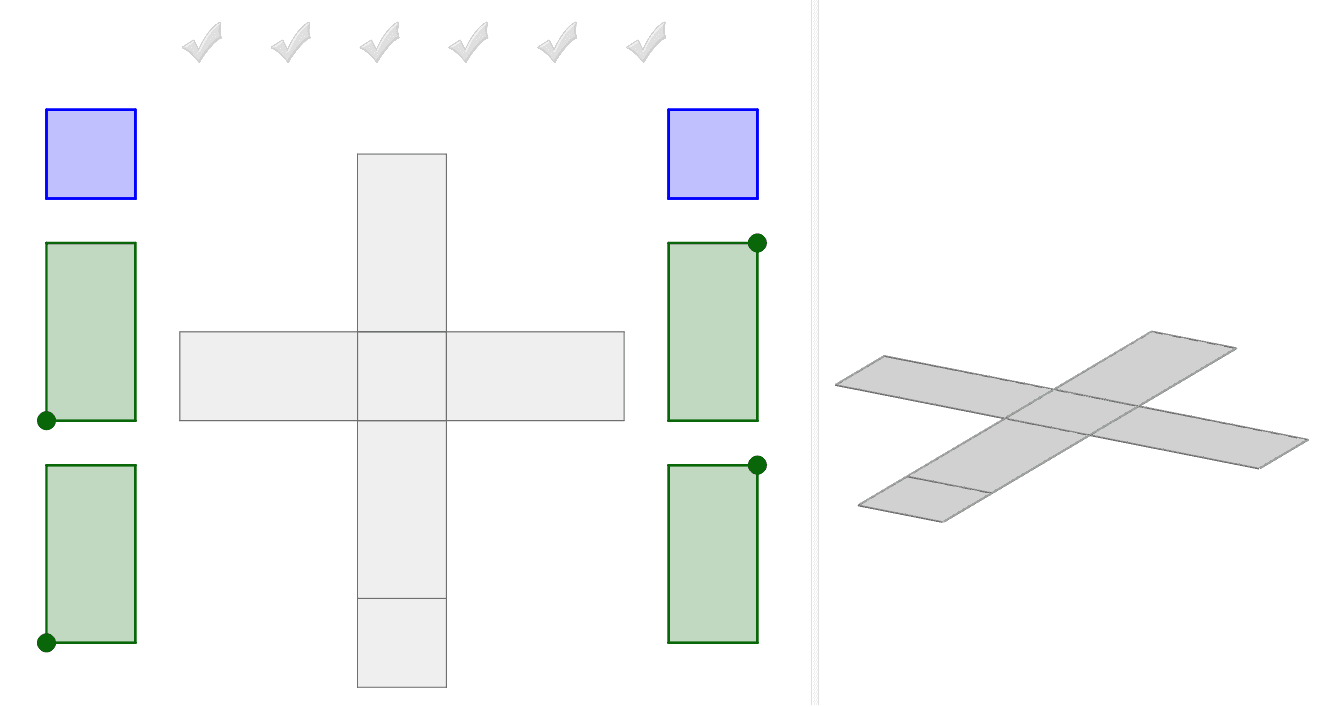
This example demonstrates how to build the net of a prism by dragging blue and green faces onto the grey net. Use the green points to rotate rectangles and understand the geometric structure of the prism. Key mathematical concepts include polygons and solid geometry. GeoGebra commands used include Polygon, Prism, and Net. Suitable for middle school and above students to learn geometric construction.
GeoGebra Commands & Parameters
Intersect(zAxis, xAxis) → APoint(xAxis) → BPolygon(A, B, 4, xOyPlane) → poly1, f, g, h, i, C, DPrism(poly1, 2) → a, E, edgeAE, edgeBF, edgeCG, edgeDH, edgeEF, edgeFG, edgeGH, edgeEH, F, G, H, faceABFE, faceBCGF, faceCDHG, faceADHE, faceEFGHPoint(Circle[B, Distance[A, B], Segment[A, B]]) → INet(a, c) → d, V_1, G_2, H_2, I_2, J_2, K_2, face1, face2, face4, face5, face3, W_1, face6, edge1, edge5, edge8, edge2, edge3, edge13, edge6, edge7, edge16, Z_1, edge9, edge10, edge17, edge11, edge12, edge18, edge4, edge15, edge19, edge14, A_2, B_2, C_2, D_2, E_2, F_2Net(a, o) → p, H_3, Q_3, R_3, S_3, T_3, U_3, face13, face14, face16, face17, face15, I_3, face18, edge39, edge43, edge46, edge40, edge41, edge51, edge44, edge45, edge54, J_3, edge47, edge48, edge55, edge49, edge50, edge56, edge42, edge53, edge57, edge52, K_3, L_3, M_3, N_3, O_3, P_3Polygon(Z_2, A_3, 4) → poly7, m_1, n_1, p_1, q_1, B_3, C_3Polygon(V_3, W_3, 4) → poly8, r_1, s_1, t_1, a_1, Z_3, A_4Point(Circle[B_4, 2]) → C_4Polygon(B_4, C_4, D_4, E_4) → poly9, b_4, c_4, d_4, e_4Point(Circle[F_4, 2]) → G_4Polygon(F_4, G_4, H_4, I_4) → poly10, f_4, g_4, h_4, i_4Point(Circle[J_4, 2]) → K_4Polygon(J_4, K_4, T_4, U_4) → poly11, j_4, k_4, t_4, u_4Point(Circle[V_4, 2]) → W_4Polygon(V_4, W_4, Z_4, A_5) → poly12, v_4, w_4, z_4, a_5Polygon(J, K, L, M) → poly2, j, k, l, mPolygon(M, N, C_1, N_2) → poly3, m_2, n, c_1, n_2Polygon(L, O_2, P_2, Q_2) → poly4, l_1, o_2, p_2, q_2Polygon(N, O_2, R_2, S_2) → poly5, n_3, o_1, r_2, s_2Polygon(L, O_2, N, M) → poly6, l_2, o_3, n_4, m_3Polygon(T_2, U_2, P_2, Q_2) → poly13, t_2, u_2, p_3, q_3AreEqual(poly7, poly8) → CheckSquaresVector(B_5, C_5) → u
AI Drawing Prompt Reference
Draw a net of a prism. Start with a square base on a horizontal plane, then extrude it upward to form a prism. Unfold the lateral faces and the top face onto the plane around the base, resulting in a flat pattern of six quadrilateral faces: two squares and four rectangles, connected along shared edges in a cross-like arrangement. Additionally, place a separate quadrilateral nearby and add a vector arrow to indicate a direction of movement. The overall figure illustrates the relationship between the 3D prism and its 2D net.
The prompt above was compiled from the original drawing commands and is for reference only.