
Magic Triangle
Loading the math board and drawing, please wait…
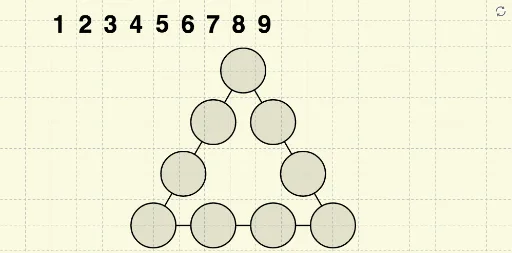
This example demonstrates a special geometric construction by dynamically adjusting points to showcase triangle properties. It involves core math concepts like coordinate geometry, function graphing, integral calculation, and sequences. Construction highlights include commands like Polygon, Circle, Intersect, Distance, and Segment in GeoGebra. Suitable for high school and above learners to understand the integration of geometric construction and calculus.
GeoGebra Commands & Parameters
Polygon(A, B, 3) → poly1, f, g, h, CCircle(A, Distance[A, B] / 3) → cCircle(B, Distance[A, B] / 3) → dCircle(C, Distance[A, B] / 3) → eIntersect(c, f, 1) → DIntersect(d, f, 1) → EIntersect(d, g, 1) → FIntersect(e, g, 1) → GIntersect(e, h, 1) → HIntersect(c, h, 1) → IDistance(A, B) → ABCircle(C, r) → kCircle(H, r) → pCircle(I, r) → qCircle(A, r) → sCircle(D, r) → tCircle(E, r) → c_1Circle(B, r) → d_1Circle(F, r) → e_1Circle(G, r) → f_1Intersect(k, h, 1) → JIntersect(p, h, 1) → KIntersect(p, h, 2) → LIntersect(q, h, 1) → MIntersect(q, h, 2) → NIntersect(s, h, 1) → OIntersect(s, f, 1) → PIntersect(t, f, 1) → QIntersect(t, f, 2) → RIntersect(c_1, f, 1) → SIntersect(c_1, f, 2) → TIntersect(d_1, f, 1) → UIntersect(d_1, g, 1) → VIntersect(e_1, g, 1) → WIntersect(e_1, g, 2) → ZIntersect(f_1, g, 1) → A_1Intersect(f_1, g, 2) → B_1Intersect(k, g, 1) → C_1Segment(J, K) → iSegment(L, M) → jSegment(N, O) → lSegment(P, Q) → mSegment(R, S) → nSegment(T, U) → aSegment(V, W) → bSegment(Z, A_1) → g_1Segment(B_1, C_1) → h_1