
Magic Square
Loading the math board and drawing, please wait…
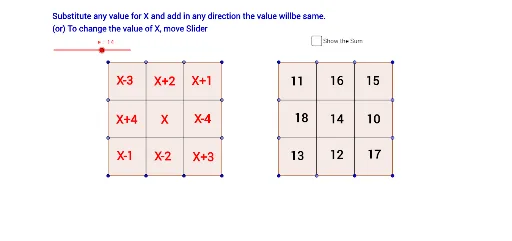
This example demonstrates the construction principle of a magic square, a special type of matrix where the sums of the numbers in each row, column, and both main diagonals are equal. The core mathematical concepts involved include matrices and vectors. Using GeoGebra commands such as Polygon, Point, and Segment, the dynamic generation process of the magic square is showcased. Suitable for high school and above mathematics enthusiasts.
GeoGebra Commands & Parameters
Polygon(A, B, C, D) → poly1, a, b, c, dPoint(a) → EPoint(c) → FSegment(E, F) → fPoint(c) → GSegment(G, H) → gPoint(d) → IPoint(b) → JSegment(I, J) → hPoint(d) → KPoint(b) → LSegment(K, L) → iPolygon(M, N, O, P) → poly2, m, n, o, pPoint(o) → QSegment(Q, R) → jPoint(o) → SSegment(S, T) → kPoint(n) → UPoint(p) → VSegment(U, V) → lPoint(p) → WPoint(n) → ZSegment(W, Z) → q
AI Drawing Prompt Reference
Draw a magic square, where the sums of the numbers in each row, column, and both main diagonals are equal. Start by drawing a quadrilateral, then place points on its sides and diagonals, and connect these points to form new quadrilaterals. Ensure that the points on the sides and diagonals correctly form the structure of the magic square.
The prompt above was compiled from the original drawing commands and is for reference only.