
Mae's Cylinder
Loading the math board and drawing, please wait…
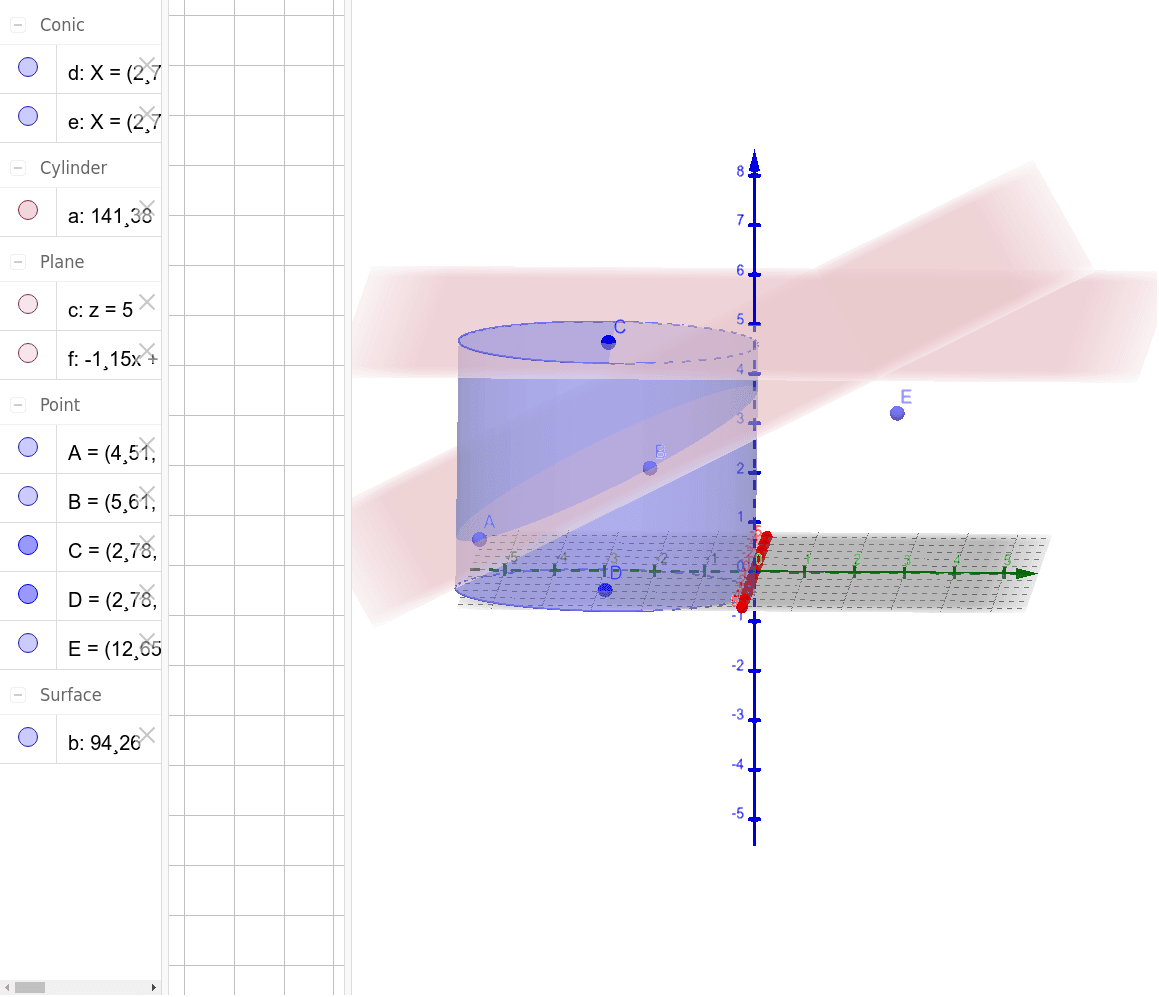
This example demonstrates how to construct a cylinder and its related geometric elements using GeoGebra. Core math concepts include solid geometry, coordinate geometry, expected value in probability & statistics, exponent functions, and histograms. Construction highlights from the summary involve commands like Cylinder, Plane, and PointIn, along with objects C, D, a, d, e, b, c, A, B, E, f. Suitable for high school students learning solid geometry, probability & statistics, and GeoGebra dynamic geometry tools.
GeoGebra Commands & Parameters
Cylinder(C, D, 3) → a, d, e, bPlane(C, xOyPlane) → cPointIn(b) → APointIn(b) → BPointIn(c) → EPlane(A, B, E) → f
AI Drawing Prompt Reference
Draw a cylinder with its two base centers at two given points in space and a radius of 3. Place three random points on the lateral surface of the cylinder)Skip, and one point on the bottom base. Then construct a plane passing through the three lateral surface points. The figure should show the cylinder, the bottom base plane, and the oblique cross-section plane determined by the three points, illustrating spatial relationships among the cylinder, points, and planes.
The prompt above was compiled from the original drawing commands and is for reference only.