
Luera Investigation - Diagonals of a Kite
Loading the math board and drawing, please wait…
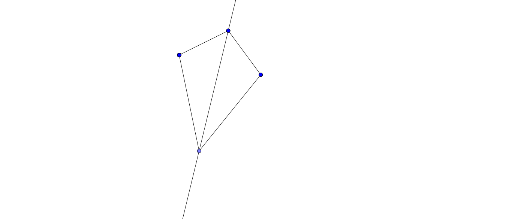
This GeoGebra example dynamically explores the diagonals of a kite, focusing on whether the diagonals are perpendicular and whether one bisects the other. Core mathematical concepts include the definition of a kite, perpendicular diagonals, angle bisectors, and symmetry. The construction uses GeoGebra commands such as Segment to draw sides, Rotate to generate symmetric vertices, AngularBisector to construct angle bisectors, and Point to mark intersections. Key objects include points A, B, f, A', A'_1, A'_2, A'_3, A'_4, B', and auxiliary lines g, h, i. This is suitable for middle or high school geometry classes or independent student investigation, allowing learners to drag vertices and observe how the diagonal properties remain invariant.
GeoGebra Commands & Parameters
Segment(A, B) → fRotate(A, 90°, A) → A'Rotate(A, 90°, A) → A'_1Rotate(A, 90°, A) → A'_2Rotate(A, 90°, A) → A'_3Rotate(A, 100°, B) → A'_4Rotate(B, 100°, B) → B'Segment(A'_4, B') → f'AngularBisector(A'_4, B, A) → gPoint(g) → CSegment(A, C) → hSegment(A'_4, C) → i
AI Drawing Prompt Reference
Draw a kite shape by first sketching two adjacent sides, then rotating one side by 90 degrees around its endpoint to find another vertex, repeating this three times to get all vertices. Next, rotate one of the sides by 100 degrees around its endpoint to find a new vertex, do the same for the adjacent side, and connect these two new vertices. Finally, draw the angle bisectors of the angles formed by these new vertices and the kite's center, marking the intersections of these bisectors with the kite's sides.
The prompt above was compiled from the original drawing commands and is for reference only.