
Circumcenter of Right Triangles
Loading the math board and drawing, please wait…
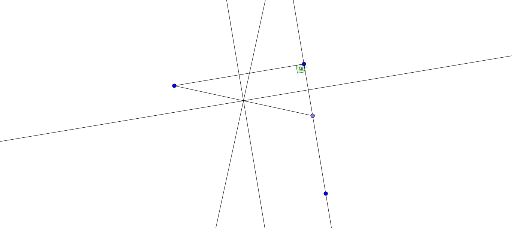
This example demonstrates the circumcenter of a right triangle and its properties. Key math concepts include circumcenter, right triangle, circle, and perpendicular bisector. Construction involves commands like Segment, Rotate, Angle, Line, Point, and LineBisector in GeoGebra. Suitable for high school mathematics education and understanding geometric properties.
GeoGebra Commands & Parameters
Segment(A, B) → fRotate(A, 90°, B) → A'Angle(A, B, A') → αLine(B, A') → gPoint(g) → CSegment(A, C) → hLineBisector(A, B) → iLineBisector(B, C) → jLineBisector(C, A) → k
AI Drawing Prompt Reference
Start by drawing a horizontal segment as one leg of a right triangle. Rotate this segment 90 degrees around one endpoint to create the other leg, and mark the right angle. Pick any point on the rotated leg, then connect it to the other endpoint of the original segment to form the hypotenuse. Next, construct the perpendicular bisectors of all three sides; they intersect at a single point, the circumcenter. Finally, draw a circle centered at this point passing through all three vertices, showing that the circumcenter is equidistant from the vertices and lies at the midpoint of the hypotenuse.
The prompt above was compiled from the original drawing commands and is for reference only.