
Lohse Square
Loading the math board and drawing, please wait…
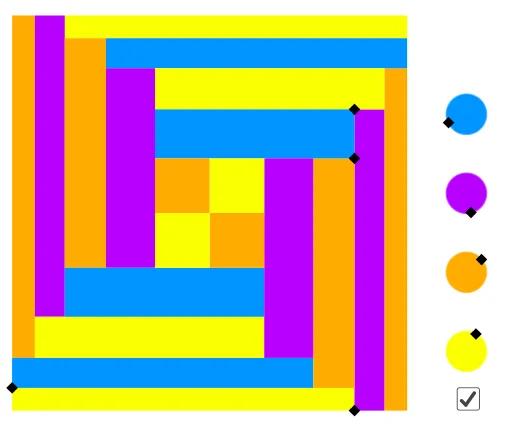
This example demonstrates the geometric transformations and symmetry of a square. It involves concepts such as square, symmetry, and transformation. Using GeoGebra commands like Point, Sequence, and Translate, the construction process of the square can be dynamically shown. Suitable for students at middle school level and above to learn about geometric transformations and symmetry.
GeoGebra Commands & Parameters
Point(Segment[(0, 0), (1, 0)]) → APoint(Segment[(0, 0), (0, 1 - x(A))]) → BSequence(Rotate[Polygon[(0, 0), A, (x(A), y(B)), B], (i * 90°), (0.5, 0.5)], i, 0, 3) → l1Point(Segment[(x(A), y(B)), (x(A), x(A))]) → CSequence(Rotate[Polygon[A, C, (1 - h, y(C)), (1 - h, 0)], (i * 90°), (0.5, 0.5)], i, 0, 3) → l2Point(Segment[(x(A), 1 - x(C)), C]) → DSequence(Rotate[Polygon[A + (0, h), D, (y(C), y(D)), (y(C), y(B))], (i * 90°), (0.5, 0.5)], i, 0, 3) → l3Sequence(Rotate[Polygon[C, D, (1 - y(D), y(D)), (1 - y(D), y(C))], (i * 90°), (0.5, 0.5)], i, 0, 3) → l4Sequence(Rotate[Polygon[(0.5, 1 - y(D)), (y(D), 1 - y(D)), (y(D), 0.5), (0.5, 0.5)], (i * 90°), (0.5, 0.5)], i, 0, 3) → l5Circle((1.15, 0.15), 0.05) → cTranslate(c, (0, 0.2)) → c'Translate(c', (0, 0.2)) → c''Translate(c'', (0, 0.2)) → c'''Point(c) → EPoint(c') → FPoint(c'') → GPoint(c''') → HElement(l1, A1) → B1Element(l1, A2) → B2Element(l1, A3) → B3Element(l1, A4) → B4Element(l2, $A1) → C1Element(l2, $A2) → C2Element(l2, $A3) → C3Element(l2, $A4) → C4Element(l3, $A1) → D1Element(l3, $A2) → D2Element(l3, $A3) → D3Element(l3, $A4) → D4Element(l4, $A1) → E1Element(l4, $A2) → E2Element(l4, $A3) → E3Element(l4, $A4) → E4Element(l5, $A1) → F1Element(l5, $A2) → F2Element(l5, $A3) → F3Element(l5, $A4) → F4
AI Drawing Prompt Reference
Draw a square and show its symmetrical figures obtained by rotating it 90 degrees four times, each figure in a different color. Add four small circles near the center of the square and align them vertically upwards. Mark four points on the circles and connect the vertices of the square and its symmetrical figures to form multiple interconnected polygons, creating a complex geometric pattern.
The prompt above was compiled from the original drawing commands and is for reference only.