
Logarithmic Functions Anatomy
Loading the math board and drawing, please wait…
In collections
Exponential & Logarithmic Functions
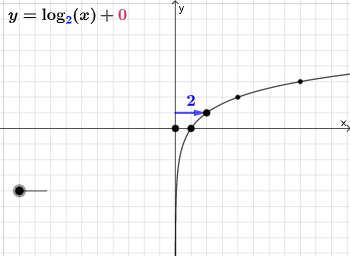
This example demonstrates the graph of logarithmic functions and their key features such as asymptotes, vertex, and tangent lines. It involves core math concepts including logarithmic function properties, derivatives, tangent equations, and analytical geometry. Construction highlights use of Point, Intersect, Vector commands to create points, intersections, and vectors, with objects like function graphs, tangents, and axes. Suitable for high school and above learners to understand function graphs and properties.
GeoGebra Commands & Parameters
Point(Ray[B + (1, 1), B + (2, 1)]) → CPoint(Ray[B + (1, -1), B + (2, -1)]) → DIntersect(xAxis, yAxis) → GVector(G, A) → uVector(H, B) → vIntersect(eq1, y = y(C)) → IIntersect(eq1, y = y(D)) → JVector(I, C) → wVector(J, D) → j
AI Drawing Prompt Reference
In a single coordinate plane, first draw the horizontal and vertical axes and mark their intersection as the reference point. From this reference, place two points on an upper pair of rays in the rightward direction and two points on a lower pair of rays in the same direction, one pair above and one pair below, so the point locations define two corresponding vector setups. Then consider a logarithmic-function style curve and identify two intersections by taking where that curve meets the vertical positions determined by the upper and lower points, producing two distinct intersection points. Finally, construct two vectors that each run from the respective intersection point toward its corresponding point on the rays, keeping the axes, curve, and these vectors as the key features for the diagram.
The prompt above was compiled from the original drawing commands and is for reference only.