
Cubic Function Anatomy: Quick Exploration
Loading the math board and drawing, please wait…
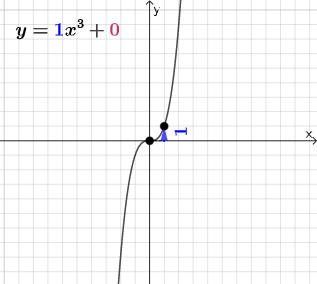
This interactive GeoGebra example provides a visual exploration of the key structural features of a cubic function's graph, including roots, extrema, inflection points, and the behavior of function values. The core mathematical concepts involve the algebraic form of cubic functions, derivatives, monotonicity, extremum determination, and the relationship between the graph and coordinate axes. The construction uses GeoGebra commands such as Point, Line, Vector, Polygon, RotateText, and Segment to build the function curve, auxiliary lines, labeled texts, and dynamic sliders, enabling users to see how parameter changes affect the graph. It is suitable for high school and above students learning function properties, or for teachers to use in classroom demonstrations and inquiry-based activities to deepen understanding of the correspondence between the graph and algebraic representation of cubic functions.
GeoGebra Commands & Parameters
Point(Segment[(h + 1, y(C) + 10), (h + 1, y(C) - 10)]) → DLine(A, B) → fVector(A, C) → uPolygon(A, C, B) → t1, b, a_1, cRotateText(text2, pi / 2) → text3Segment(A, C) → h_{1}Vector(C, D) → vVector((h, 0), A) → wVector((0, 0), (h, 0)) → j
AI Drawing Prompt Reference
Draw a cubic function graph on coordinate axes showing its roots, extrema, and inflection points. Include horizontal lines marking x-intercepts and dashed vertical lines indicating the positions of critical points. Add vectors from the origin to a parameter point and from points on the function to auxiliary vertical lines, forming a triangle to represent a specific interval of the function. Use rotated text labels to mark the inflection point location, and include a horizontal slider to adjust parameter h for dynamically demonstrating how the function changes with the parameter.
The prompt above was compiled from the original drawing commands and is for reference only.