
Locus of an Ellipse
Loading the math board and drawing, please wait…
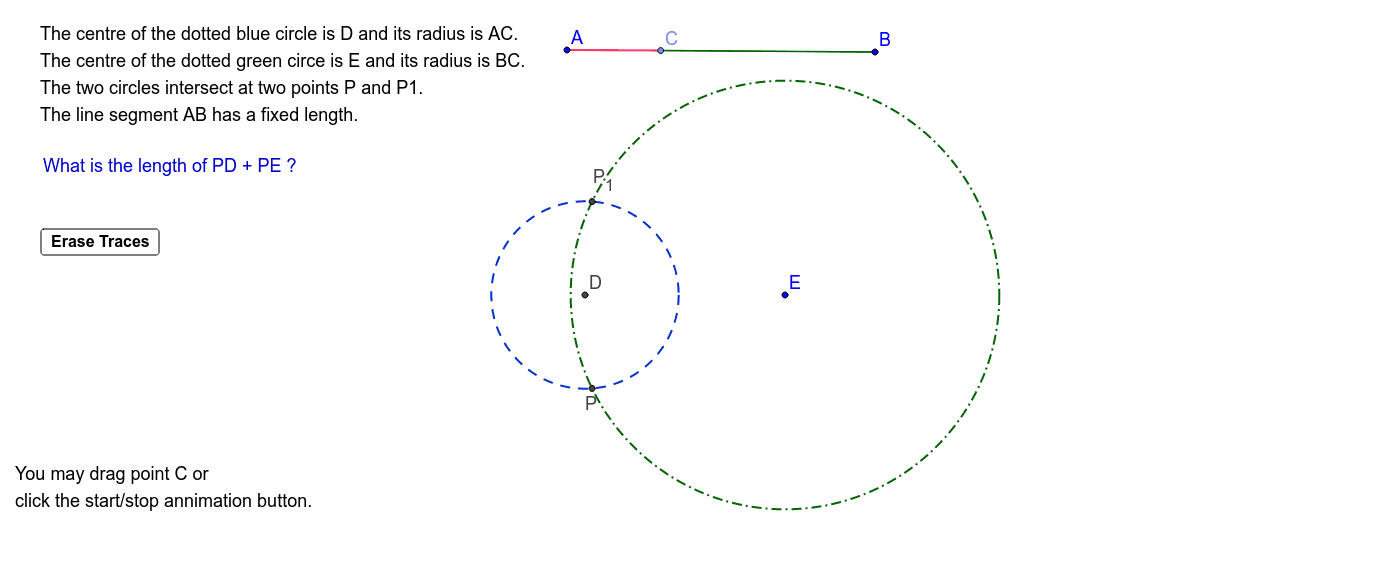
This example demonstrates the construction of an ellipse's locus. Key math concepts include ellipse definition, geometric construction, and parametric equations. It uses GeoGebra commands/objects like Segment, Point, Intersect, and Circle. Suitable for high school mathematics teaching and geometric construction learning.
GeoGebra Commands & Parameters
Segment(A, B) → aPoint(a) → CSegment(A, C) → bIntersect(xAxis, yAxis) → DCircle(D, b) → cSegment(C, B) → dCircle(E, d) → eIntersect(c, e) → P_1, P, ,
AI Drawing Prompt Reference
Draw the locus of an ellipse by starting with a line segment, marking a point on it, and forming two new segments from the endpoints to this point. Then, locate the intersection of the coordinate axes and draw a circle with one of the new segments as the radius. Next, draw another circle using the other new segment as the radius, centered at the marked point. The intersections of these two circles give points on the ellipse, which can be connected to form the ellipse's locus.
The prompt above was compiled from the original drawing commands and is for reference only.