
Locus Introduction
Loading the math board and drawing, please wait…
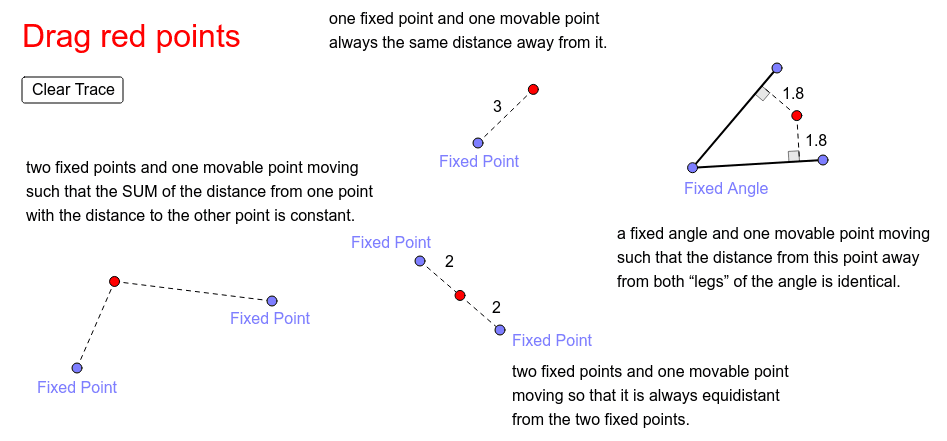
This example demonstrates the construction and properties of various elementary locus types. It involves core mathematical concepts such as perpendicular bisectors, ellipses, circles, angles, and midpoints. The construction utilizes commands and objects like LineBisector, Point, Line, Segment, OrthogonalLine, Distance, Ellipse, Circle, Ray, Intersect, Angle, and Midpoint. It is suitable for middle school students and above, or as an educational aid for math competitions.
GeoGebra Commands & Parameters
LineBisector(B_1, C_1) → a_1Point(a_1) → WLineBisector(B_1, C_1) → jPoint(j) → FixedLine(C_1, Fixed) → f_1Segment(Fixed, C_1) → kOrthogonalLine(W, k) → pLine(B_1, Fixed) → g_1Segment(Fixed, B_1) → lOrthogonalLine(W, l) → nLineBisector(B, C) → aDistance(F, G) → distanceFGEllipse(K, L, M) → cPoint(c) → NSegment(K, N) → dSegment(N, L) → eCircle(A, distanceFG) → fPoint(f) → OSegment(A, O) → gPoint(a) → PSegment(B, P) → hSegment(P, C) → iDistance(i, h) → bSegment(B_1, W) → h_1Segment(W, C_1) → i_1Distance(h_1, i_1) → b_1LineBisector(B_1, C_1) → mRay(Fixed, B_1) → qRay(Fixed, C_1) → rIntersect(n, g_1) → DSegment(W, D) → sIntersect(p, f_1) → ESegment(W, E) → tSegment(B_1, D) → c_1Segment(C_1, E) → d_1Angle(W, E, Fixed) → αAngle(Fixed, D, W) → βMidpoint(P, B) → IMidpoint(P, C) → JMidpoint(W, D) → QMidpoint(W, E) → RMidpoint(A, O) → S
AI Drawing Prompt Reference
Draw a figure with perpendicular bisectors, ellipses, circles, and angles. Start by drawing perpendicular bisectors and finding their intersections, then draw segments, circles, and ellipses, construct perpendicular lines and angles, and finally mark midpoints.
The prompt above was compiled from the original drawing commands and is for reference only.