
Locus Construction of Ellipse
Loading the math board and drawing, please wait…
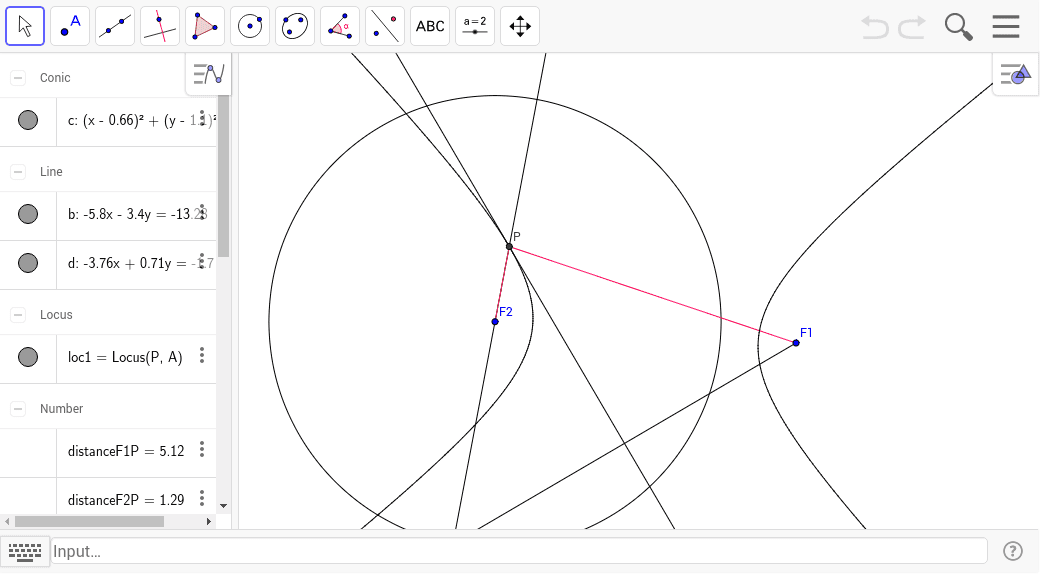
This example demonstrates the construction of an ellipse as a locus. First, a circle is created, and a point A is taken on the circle. Another point F1 is taken inside the circle. A line segment is constructed through points A and F1, and its perpendicular bisector is constructed. Then, a line a is constructed through points A and F1, intersecting the perpendicular bisector at point B. Another line b is constructed through points B and F1, intersecting the circle at point P. Finally, the distance line segment is constructed between points F1 and P. As point P moves on the circle, the sum of distances from P to F1 and F2 remains constant, forming an ellipse locus. This example uses Circle, Point, Segment, LineBisector, Line, Intersect, Locus, Distance commands. Suitable for high school mathematics education and learning.
GeoGebra Commands & Parameters
Circle(F2, B) → cPoint(c) → ASegment(A, F1) → aLineBisector(a) → bLine(A, F2) → dIntersect(d, b) → PLocus(P, A) → loc1Segment(P, F2) → fDistance(F1, P) → distanceF1PDistance(F2, P) → distanceF2PSegment(F1, P) → eDistance(F1, P) → g