
Lissajous Figures
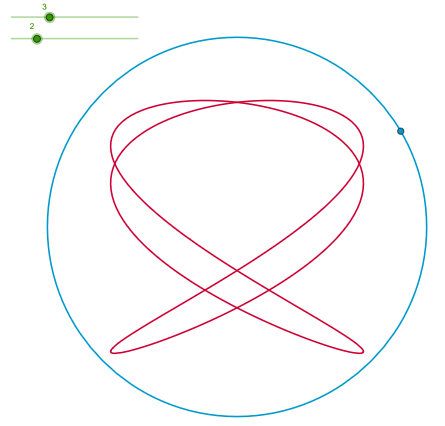
Loading the math board and drawing, please wait…
In collections
Música y Matemáticas
This example demonstrates the generation of Lissajous figures, which are the trajectories of two sine or cosine functions. Lissajous figures are often used in the combination of music and mathematics. By adjusting parameters a and b, different shapes of Lissajous figures can be observed. The construction uses Circle, Point, Angle, and CurveCartesian commands. Suitable for high school mathematics education and learning.
GeoGebra Commands & Parameters
Circle((0, 0), 6) → dPoint(d) → AAngle((1, 0), (0, 0), A) → αCurveCartesian((4 * sin((a * t) + α)), (4 * sin((b * t))), t, 0, (2 * p)) → c
AI Drawing Prompt Reference
Draw a Lissajous figure. Start by constructing a circle centered at the origin with radius 6. Place a moving point on this circle, and measure the angle between the positive x-axis and the line from the origin to this point. Use this angle as a phase shift. Then plot a parametric curve where the x-coordinate is 4 times the sine of (parameter a times the time variable plus the phase angle), and the y-coordinate is 4 times the sine of (parameter b times the time variable). Let the time variable run from 0 to 2π. By varying parameters a and b, different closed, symmetric, and smooth curve shapes can be obtained, illustrating the combination of two harmonic motions.
The prompt above was compiled from the original drawing commands and is for reference only.