
Lines in a Triangle by Mr_Stewart_Maths
Loading the math board and drawing, please wait…
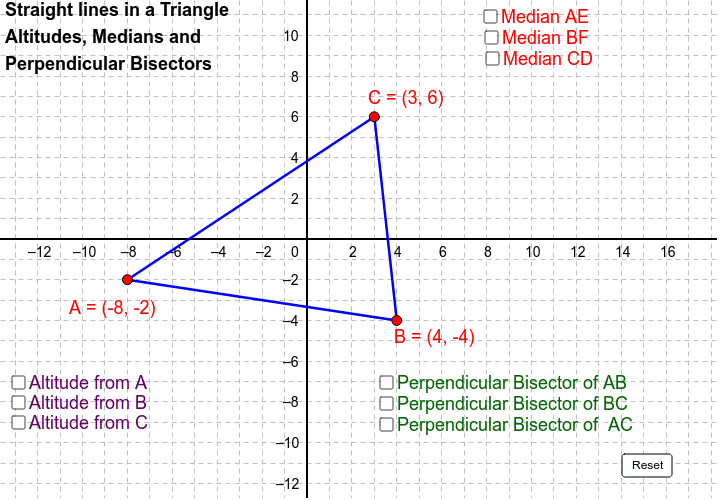
This example demonstrates the construction and relationships of various lines within and around a triangle, including medians, perpendiculars, and angle bisectors. It involves core math concepts like coordinate geometry, vectors, trigonometry, and calculus. The construction uses commands such as Segment, Midpoint, Line, OrthogonalLine, and Intersect. Suitable for high school and above students to explore geometric constructions and calculations.
GeoGebra Commands & Parameters
Segment(A, C) → aSegment(C, B) → bSegment(B, A) → cMidpoint(A, B) → DMidpoint(B, C) → EMidpoint(C, A) → FLine(A, E) → dLine(F, B) → eLine(C, D) → fOrthogonalLine(B, a) → jOrthogonalLine(A, b) → kOrthogonalLine(C, c) → lMidpoint(A, C) → GMidpoint(C, B) → HMidpoint(B, A) → IOrthogonalLine(I, c) → pOrthogonalLine(H, b) → qOrthogonalLine(G, a) → rIntersect(j, k) → JIntersect(d, e) → K
AI Drawing Prompt Reference
Draw a triangle ABC, then connect the midpoints of each side to form the medians, draw the perpendicular bisectors of each side, and then draw the altitudes from each vertex to the opposite side. Finally, find the orthocenter and centroid. First, draw the three sides of the triangle, then find the midpoints of each side and connect them to form the medians; next, draw the perpendicular bisectors of each side, then draw the altitudes from each vertex to the opposite side, and finally find the orthocenter and centroid.
The prompt above was compiled from the original drawing commands and is for reference only.