
Lines from Slope and Intercept
Loading the math board and drawing, please wait…
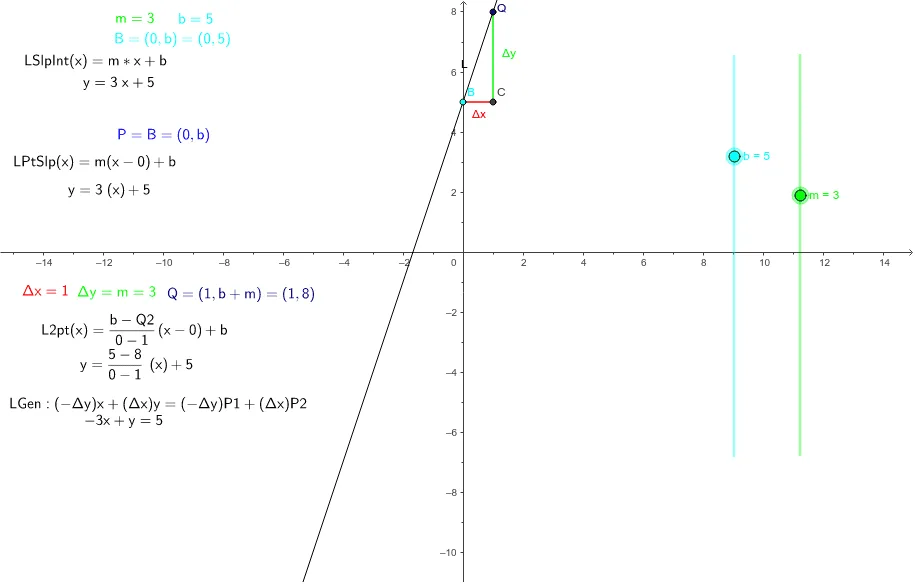
This example demonstrates how to define a line using slope and intercept, and then converts it to other formats. It involves core math concepts like slope-intercept form, coordinate geometry, and line representation. Key GeoGebra commands and objects used include Line, Segment, m, b, Q, L, C, Δx, Δy, LSlpIntL, LSlpIntEqn, etc. Suitable for high school students learning about different forms of linear equations and their applications.
GeoGebra Commands & Parameters
Line(B, Q) → LSegment(C, B) → ΔxSegment(Q, C) → Δy
AI Drawing Prompt Reference
Draw a line defined by its slope and intercept. Place one point on the y-axis to represent the intercept, and another point on the x-axis to determine the slope. Connect these two points with a straight line extending across the view. Then, from the x-axis point, draw a horizontal segment to the y-axis point, and from that y-axis point, draw a vertical segment up to the line, forming a right triangle that illustrates the ratio of vertical change to horizontal change.
The prompt above was compiled from the original drawing commands and is for reference only.