
Linear (Tangent Line) Approximation
Loading the math board and drawing, please wait…
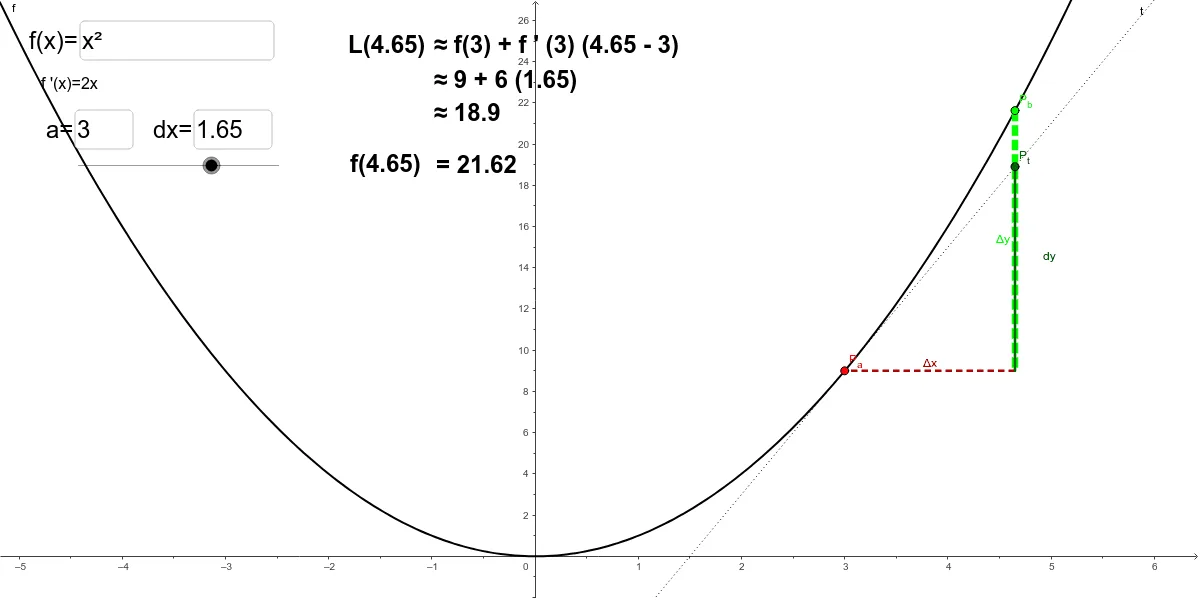
This example demonstrates how a tangent line at a point on a function can be used to approximate function values nearby. Key math concepts include derivatives, tangent line equations, and linear approximation. It is constructed using GeoGebra commands like Tangent, Segment, Intersect, Textfield, and Derivative, involving objects such as function f, point P_a, t, dx, vb, etc. Suitable for high school and above students learning calculus and function approximation.
GeoGebra Commands & Parameters
Tangent(P_a, f) → tSegment(P_b, P_1) → ΔySegment(P_1, P_a) → ΔxIntersect(t, vb) → P_tSegment(P_1, P_t) → dyTextfield(f) → InputBox1Textfield(a) → InputBox2Textfield(dx) → InputBox3Derivative(f) → f'
AI Drawing Prompt Reference
Draw a function graph and mark a point on it. From this point, draw a tangent line, and show the intersections with the x-axis and the tangent line. Also, draw lines connecting these intersection points and the original function, labeling the derivative and tangent line equation to demonstrate how the tangent approximates function values.
The prompt above was compiled from the original drawing commands and is for reference only.