
Linear Equation with Point and Slope
Loading the math board and drawing, please wait…
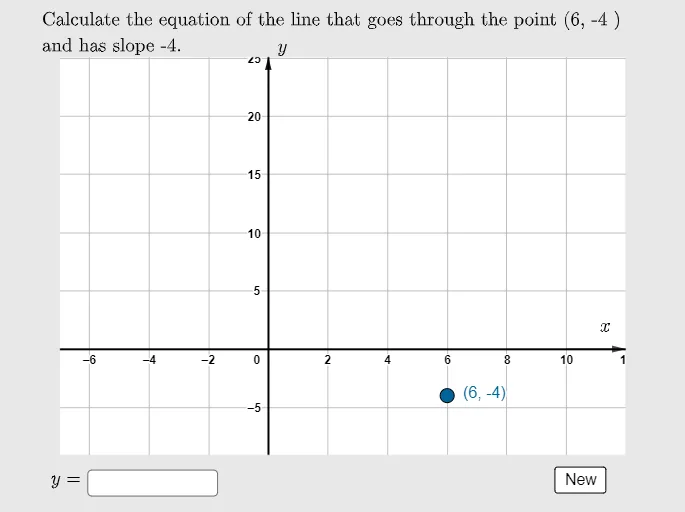
This example demonstrates drawing a linear equation through a given point and slope. It involves core math concepts like linear equations, point-slope form, and coordinate geometry. Construction highlights include commands like Random, RandomElement, Max, Min, If, Polygon, Textfield, and Vector. Suitable for high school mathematics teaching and learning the method of drawing linear equations.
GeoGebra Commands & Parameters
Random(-2, 20) → bRandom(-5, 7) → dRandomElement(clist) → cMax({y(A) + 10, y(B) + 10, 10}) → ymaxMin({y(A) - 10, y(B) - 10, -10}) → yminIf((ymax - ymin) / 9 < 10, (ymax - ymin) / 9, If[(ymax - ymin) / 10 < 10, (ymax - ymin) / 10, (ymax - ymin) / 12]) → yscalePolygon({C1, C2, C3, C4}) → q1Textfield(f) → InputBox1Vector((0, ymax - (1.5 * yscale)), (0, ymax - yscale)) → vVector((10, 0), (12, 0)) → u
AI Drawing Prompt Reference
Draw a line through a randomly selected point with a random slope. First determine the intercept and point, then calculate suitable coordinate range and scaling. Next, draw a quadrilateral as a background and add a text box for input. Then create two vectors, one vertical and one horizontal, to assist in drawing the line. Finally, plot the line based on the point and slope.
The prompt above was compiled from the original drawing commands and is for reference only.