
Linear Combination of Two Vectors in 2D
Loading the math board and drawing, please wait…
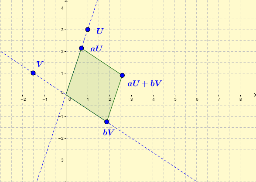
This example illustrates how to generate a new vector by taking a linear combination of two vectors in the plane and visualizes the resulting geometric shape. Key concepts include vector addition, scalar multiplication, linear dependence, and the geometric interpretation of vectors in coordinate geometry. Built with GeoGebra commands Intersect, Vector, Line, Point, and Polygon, the construction defines the origin O, vectors u and v, adjustable scalars a and b, the combined vector w, and draws polygon poly1 to show the combination result. Intended for high school and college students studying linear algebra and analytic geometry, as well as for interactive teaching and exploration of vector operations.
GeoGebra Commands & Parameters
Intersect(xAxis, yAxis) → OVector(U) → vecULine(O, U) → aPoint(a) → aUVector(aU) → vecaUVector(V) → vecVLine(O, V) → bPoint(b) → bVVector(bV) → vecbVVector(W) → vecWPolygon(O, aU, W, bV) → poly1, o, au, w, bv
AI Drawing Prompt Reference
Draw two vectors u and v in the plane, and their linear combination vector w. Start by defining the origin O, then draw vectors u and v. Adjust coefficients a and b to generate vector w, and use points O, aU, w, and bV to draw a quadrilateral to illustrate the linear combination of vectors.
The prompt above was compiled from the original drawing commands and is for reference only.