
Like Terms by tmoorehead
Loading the math board and drawing, please wait…
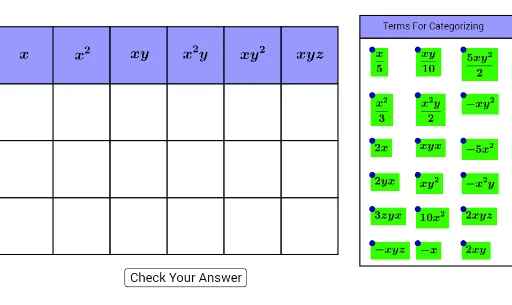
This example demonstrates how to visualize the concept of like terms in algebra using geometric constructions in GeoGebra. It involves core math concepts like algebraic operations, geometric representations, and function graphing. Key GeoGebra commands used include Intersect, Point, Polygon, Midpoint, Line, and OrthogonalLine to construct geometric figures aiding in understanding like terms. Suitable for middle school and above students to grasp fundamental algebraic concepts and geometric visualization.
GeoGebra Commands & Parameters
Intersect(xAxis, yAxis) → APoint(xAxis) → BPolygon(A, B, 4) → poly1, f, g, h, i, C, DPolygon(C, B, 4) → poly2, j, k, l, m, E, FPolygon(F, E, 4) → poly3, n, p, q, r, G, HPolygon(H, G, 4) → poly4, s, t, a, b, I, JPolygon(J, I, 4) → poly5, c, d, e, f_1, K, LPolygon(L, K, 4) → poly6, g_1, h_1, i_1, j_1, M, NPolygon(B, A, 4) → poly7, k_1, l_1, m_1, n_1, O, PPolygon(E, B, 4) → poly8, p_1, q_1, r_1, s_1, Q, RPolygon(G, E, 4) → poly9, t_1, a_1, b_1, c_1, S, TPolygon(I, G, 4) → poly10, d_1, e_1, f_2, g_2, U, VPolygon(K, I, 4) → poly11, h_2, i_2, j_2, k_2, W, ZPolygon(M, K, 4) → poly12, l_2, m_2, n_2, p_2, A_1, B_1Polygon(P, O, 4) → poly13, q_2, r_2, s_2, t_2, C_1, D_1Polygon(R, P, 4) → poly14, a_2, b_2, c_2, d_2, E_1, F_1Polygon(T, R, 4) → poly15, e_2, f_3, g_3, h_3, G_1, H_1Polygon(V, T, 4) → poly16, i_3, j_3, k_3, l_3, I_1, J_1Polygon(Z, V, 4) → poly17, m_3, n_3, p_3, q_3, K_1, L_1Polygon(B_1, Z, 4) → poly18, r_3, s_3, t_3, a_3, M_1, N_1Polygon(D_1, C_1, 4) → poly19, b_3, c_3, d_3, e_3, O_1, P_1Polygon(F_1, D_1, 4) → poly20, f_4, g_4, h_4, i_4, Q_1, R_1Polygon(H_1, F_1, 4) → poly21, j_4, k_4, l_4, m_4, S_1, T_1Polygon(J_1, H_1, 4) → poly22, n_4, p_4, q_4, r_4, U_1, V_1Polygon(L_1, J_1, 4) → poly23, s_4, t_4, a_4, b_4, W_1, Z_1Polygon(N_1, L_1, 4) → poly24, c_4, d_4, e_4, f_5, A_2, B_2Midpoint(D, B) → C_2Midpoint(C, E) → D_2Midpoint(F, G) → E_2Midpoint(H, I) → F_2Midpoint(J, K) → G_2Midpoint(L, M) → H_2Midpoint(N, M) → I_2Line(B_5, A_5) → g_5Point(g_5) → J_2Point(g_5) → M_2Line(B_2, Z_1) → i_5OrthogonalLine(J_2, g_5) → j_5OrthogonalLine(M_2, g_5) → k_5Line(K_2, O_2) → h_5Intersect(j_5, h_5) → P_2Intersect(k_5, h_5) → Q_2Polygon(P_2, Q_2, M_2, J_2) → poly25, p_5, q_5, m_5, j_6Polygon(J_2, L_2, N_2, M_2) → poly26, j_7, l_5, n_5, m_6Midpoint(A, P) → L_3Midpoint(A, L_3) → M_3Midpoint(O, D_1) → N_3Midpoint(O, N_3) → O_3Midpoint(C_1, P_1) → P_3Midpoint(C_1, P_3) → Q_3Midpoint(B, R) → R_3Midpoint(B, R_3) → S_3Midpoint(P, F_1) → T_3Midpoint(P, T_3) → U_3Midpoint(D_1, R_1) → V_3Midpoint(D_1, V_3) → W_3Midpoint(E, T) → Z_3Midpoint(E, Z_3) → A_4Midpoint(G, V) → B_4Midpoint(G, B_4) → C_4Midpoint(R, H_1) → D_4Midpoint(R, D_4) → E_4Midpoint(F_1, T_1) → F_4Midpoint(F_1, F_4) → G_4Midpoint(H_1, V_1) → H_4Midpoint(H_1, H_4) → I_4Midpoint(T, J_1) → J_4Midpoint(T, J_4) → K_4Midpoint(I, Z) → L_4Midpoint(I, L_4) → M_4Midpoint(V, L_1) → N_4Midpoint(V, N_4) → O_4Midpoint(J_1, Z_1) → P_4Midpoint(J_1, P_4) → Q_4Midpoint(K, B_1) → R_4Midpoint(K, R_4) → S_4Midpoint(Z, N_1) → T_4Midpoint(Z, T_4) → U_4Midpoint(L_1, B_2) → V_4Midpoint(L_1, V_4) → W_4
AI Drawing Prompt Reference
Draw a complex geometric figure composed of multiple quadrilaterals connected by midpoints and perpendicular lines. Start by drawing the intersection point A of the x-axis and y-axis, then draw point B on the x-axis. Use A and B as vertices to draw a quadrilateral, and then draw a series of quadrilaterals outward from its sides, forming a complex structure. Finally, connect these quadrilaterals with midpoints and perpendicular lines to create a cohesive whole.
The prompt above was compiled from the original drawing commands and is for reference only.