
Level Curves with Gradient Field
Loading the math board and drawing, please wait…
In collections
intersection: surface-surface, curve-curve
intersection: surface-surface, curve-curve
intersection: surface-surface, curve-curve
intersection: surface-surface, curve-curve
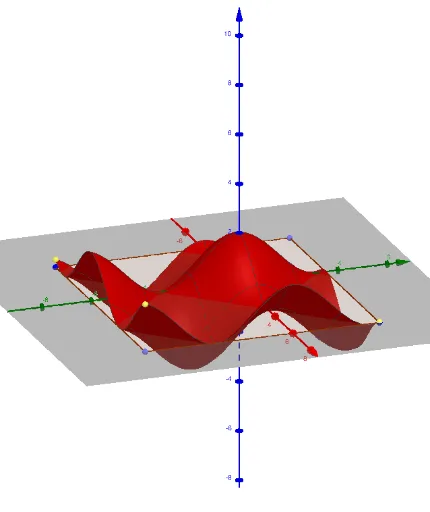
This example demonstrates the visualization of level curves and gradient fields for a function. It involves core mathematical concepts like level curves, gradient fields, function graphs, and analytical geometry. Construction highlights include using commands such as Line, Point, Midpoint, Mirror, Polygon, Function, Textfield, IntersectPath, ImplicitCurve, Max, Min, Sequence, and Derivative to create interactive visualizations. Suitable for high school students and math enthusiasts to understand the geometric properties of multivariable functions and gradient fields.
GeoGebra Commands & Parameters
Line(A, yAxis) → r_2Point(r_2) → DLine(A, xAxis) → r_1Point(r_1) → BMidpoint(D, B) → MMirror(A, M) → CPolygon(A, B, C, D) → Polígon1, a, b, c, dFunction(f(s, t), s, x(A), x(B), t, y(A), y(D)) → gTextfield(f) → CampEntradaSortida1Point(zAxis) → PIntersectPath(h, f) → iImplicitCurve(f(x, y) - f_{(x,y)}) → jMax(l1) → mxMin(l1) → mnSequence(ImplicitCurve[f(x, y) - s], s, -5, 5, k) → llista1Point(j) → EDerivative(f, x) → f_xDerivative(f, y) → f_ySequence(Sequence[(x(A) + (k * (x(B) - x(A)) / dens), y(A) + (l * (y(D) - y(A)) / dens)), l, 0, dens], k, 0, dens) → lli_1Sequence(Sequence[Vector[Element[lli_1, k, l], Element[lli_1, k, l] + (f_x(Element[lli_1, k, l]), f_y(Element[lli_1, k, l]))], l, 0, dens], k, 0, dens) → lli_2
AI Drawing Prompt Reference
Draw level curves and gradient field for a function. First, draw the x-axis and y-axis, then find their midpoint to construct a rectangle. Plot the function graph and input the function expression. Take a point on the z-axis, find its intersection with the function graph, and draw the level curves. Calculate the partial derivatives of the function to generate the sequence of gradient field vectors.
The prompt above was compiled from the original drawing commands and is for reference only.