
Law of Sines Demonstration
Loading the math board and drawing, please wait…
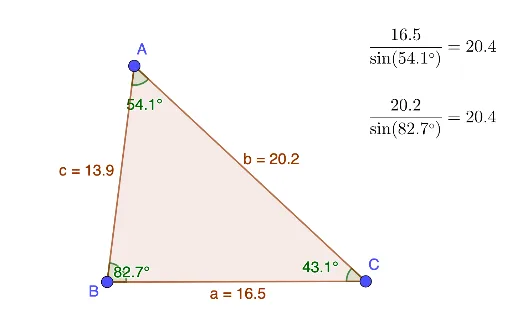
This example demonstrates the application of the Law of Sines in any triangle, visually showing the relationship between the lengths of sides and the sines of their corresponding angles. Core mathematical concepts include the Law of Sines, triangle geometry, the unit circle, and trigonometric functions. Construction highlights involve using GeoGebra commands like Polygon to draw triangles, InteriorAngles to calculate interior angles, and objects such as vertices A, B, C, angles α, β, γ, side lengths a, b, c, and text annotations. Suitable for high school mathematics instruction to help students intuitively understand and apply the Law of Sines in solving triangle problems.
GeoGebra Commands & Parameters
Polygon(A, B, C) → t1, c, a, bInteriorAngles(t1) → α, β, γ
AI Drawing Prompt Reference
Draw an arbitrary triangle, label its three vertices and corresponding interior angles, and display the lengths of its sides. Use the unit circle to show the relationship between angles and their sine values, and add text annotations explaining the Law of Sines that connects the side lengths to the sines of their opposite angles to help students intuitively understand the theorem.
The prompt above was compiled from the original drawing commands and is for reference only.