
Law of Cosines: Discovery Investigation
Loading the math board and drawing, please wait…
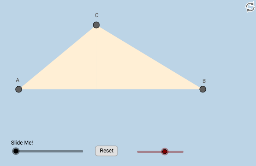
① This interactive GeoGebra example demonstrates the Law of Cosines by allowing users to manipulate a triangle and observe how the squared side lengths relate to the cosine of the included angle, leading to a discovery of the formula c² = a² + b² - 2ab·cosγ. ② Core mathematical concepts include the Law of Cosines, triangle geometry, angle measurement, vectors, circumcircles, and translations. ③ Construction highlights: using GeoGebra commands such as Rotate, Angle, Ray, Segment, Point, OrthogonalLine, Intersect, Polygon, Distance, Min, Circle, CircleSector, Dilate, and Line, the applet builds a dynamic triangle with auxiliary circles, angle bisectors, and a circumcircle, enabling real-time updates of side lengths and cosine values as vertices are dragged. ④ Suitable for high school geometry or trigonometry classes as a discovery-based learning tool, and also useful for college-level review or teacher demonstrations. The construction integrates dynamic geometry with algebraic computation, fostering an inquiry-driven understanding of the theorem.
GeoGebra Commands & Parameters
Rotate(A_1, α, C) → A'Angle(A_1, C, A') → βRay(A_1, A') → fSegment(A_1, C) → gRay(C, A') → hRay(C, A_1) → iPoint(i) → APoint(h) → BSegment(A, B) → jSegment(C, A) → kSegment(C, B) → lOrthogonalLine(C, j) → mIntersect(m, j) → DPolygon(A, D, C) → poly1, b, c, ePolygon(D, C, B) → poly2, d, e_1, b_1Angle(C, D, A) → γDistance(A, D) → aDistance(D, B) → nMin(a, n) → oCircle(D, (0.2 * o)) → pSegment(C, D) → qIntersect(p, j) → F, GIntersect(p, q) → H,CircleSector(D, G, H) → rDilate(C, If[0 < s ≤ 1, 1 - s, 0], D) → B'Segment(C, B') → tRotate(r, If[1.5 < s ≤ 2.5, ((s - 1.5) * π / 2), π / 2], D) → r'Dilate(D, If[2.5 < s ≤ 3.5, 3.5 - s, 0], A) → E'Dilate(C, If[2.5 < s ≤ 3.5, 3.5 - s, 0], A) → B'_1Segment(C, B'_1) → f_1Segment(D, E') → g_1Circle(D, 1) → c_1Intersect(c_1, m, 1) → ILine(A, m) → h_1Line(B, m) → i_1OrthogonalLine(I, m) → j_1Intersect(h_1, j_1) → JIntersect(i_1, j_1) → KPolygon(A, D, C) → poly3, c_2, a_1, d_1Dilate(D, If[2.5 < s ≤ 3.5, 3.5 - s, 0], B) → D'Dilate(C, If[2.5 < s ≤ 3.5, 3.5 - s, 0], B) → C'Segment(C, C') → k_1Segment(D, D') → l_1Dilate(A, If[3.5 < s ≤ 4.5, 4.5 - s, 0], J) → A'_1Dilate(B, If[3.5 < s ≤ 4.5, 4.5 - s, 0], K) → B'_2Segment(A, A'_1) → m_1Segment(B, B'_2) → n_1Dilate(J, If[4.5 < s ≤ 5.5, 5.5 - s, 0], K) → J'Segment(J, J') → p_1
AI Drawing Prompt Reference
Draw a dynamic triangle with one side rotated to form an included angle, illustrating the Law of Cosines. Construct a triangle, drop a perpendicular from a vertex to the opposite side, and mark the foot. Use the foot as center to draw a small circle and a sector representing the angle. Add auxiliary lines to divide the triangle into smaller parts, showing relationships between side lengths and cosine values. Use a slider to progressively reveal different stages of the construction.
The prompt above was compiled from the original drawing commands and is for reference only.